
Focus and health
Desk Stretches and the 20-20-20 Rule for Programmers
A coding break reminder built on official advice: the 20-20-20 rule for eye strain, hourly movement breaks, five NHS desk stretches and simple reminder setups.
On this page
A good coding break reminder covers two rhythms: every 20 minutes, look at something at least 20 feet away for at least 20 seconds (the 20-20-20 rule for eye strain), and about once an hour, get up for a few minutes to stand, stretch and move. The first comes from the American Academy of Ophthalmology and the American Optometric Association, the second from OSHA's guidance on computer work. Set a timer for both, use the time an AI agent spends working as your cue to look away, and keep a five-minute stretch routine for the hourly break.
Every health claim here is taken from the American Academy of Ophthalmology, the American Optometric Association, the NHS and OSHA, checked on October 3, 2026. This is general guidance, not medical advice: if you have pain, numbness or eye symptoms that don't go away, see a doctor or an eye care professional.
The 20-20-20 rule
The rule is short enough to remember mid-debug:
- every 20 minutes,
- look at something at least 20 feet (about 6 meters) away,
- for at least 20 seconds.
The AAO calls regular breaks using the 20-20-20 rule the best way to protect your eyes against eye strain, and the AOA gives the same rule for digital eye strain, which it also calls computer vision syndrome.
Why it helps: according to the AAO, people normally blink about 15 times a minute but only 5 to 7 times a minute while using screens, and blinking is how the eye keeps its surface moist. Screen work also makes the eyes work harder, as the AOA explains, and it describes the 20-second look into the distance as a way "to allow the eyes a chance to refocus."
The good news, also from the AAO: screens don't permanently damage your eyes, and eye strain doesn't cause lasting damage. The symptoms are real, though. The AOA lists eye strain, headaches, blurred vision, dry eyes, and neck and shoulder pain as the most common ones.
What else the eye doctors recommend
The 20-20-20 rule works best alongside a few setup changes. Here is what each organization says:
| Tip | What it says | Source |
|---|---|---|
| Blink on purpose | Make a conscious effort to blink often; a sticky note on the screen can help | AAO |
| Use artificial tears | Refresh dry eyes; a humidifier helps in a dry room | AAO |
| Screen distance | About 25 inches, roughly arm's length (AAO); 20 to 28 inches (AOA) | AAO, AOA |
| Screen height | Slightly below eye level, about 15 to 20 degrees down from your eyes to the screen's center | AOA |
| Brightness | Match screen brightness to the room; raising contrast can help | AAO |
| Glare | Position the screen away from windows and overhead light; use a matte filter if you can't | AAO, AOA |
| Longer rest | Rest your eyes for 15 minutes after two hours of continuous computer use | AOA |
| Blue light glasses | Skip them; there's a lack of evidence that they work | AAO |
| Glasses for screen distance | Ask about computer glasses if you work at a screen for hours; a general prescription may not suit that distance | AAO, AOA |
If you're still experiencing eye strain after adjusting your workspace, the AAO says an ophthalmologist can help, and to see one if your eyes are consistently red, blurry or watery, or become sensitive to light or painful.
Breaks for the rest of your body
Long coding sessions are hard on more than your eyes. OSHA's computer workstations guide notes that holding a static posture, such as looking at a monitor, for a long time without a break can fatigue the muscles of the neck and shoulders. Its recommendation:
Every hour, take a five-minute break from computer tasks. Look away, stretch, get up, or walk.
OSHA also suggests short micro breaks during which you stand, stretch and move around, and mixing non-computer tasks into the day. The NHS makes a related point in its physical activity guidelines: reduce time spent sitting and break up long periods of not moving with some activity.
Put together, the official guidance gives you three timers:
| How often | What to do | Source |
|---|---|---|
| Every 20 minutes | Look 20 feet away for 20 seconds | AAO, AOA |
| Every hour | Five minutes away from the computer: stand, stretch, walk | OSHA |
| Every two hours of continuous screen work | Rest your eyes for 15 minutes | AOA |
If you already use the Pomodoro Technique, the hourly break fits naturally: a short break after each 25-minute pomodoro and a longer one after four. Our guide to pomodoro for developers shows how to combine it with AI agents that keep working while you're away.
A five-minute desk stretch routine
These five come from the NHS sitting exercises and flexibility exercises pages. The NHS describes them as gentle, recommends a solid, stable chair without wheels and with your feet flat on the floor, and says to check with a GP or health professional if you're not sure they suit you. Move only as far as is comfortable.
- Chest stretch. Sit upright, away from the back of the chair. Pull your shoulders back and down, extend your arms out to the side, then gently push your chest forward and up until you feel a stretch across it. Hold for 5 to 10 seconds and repeat 5 times. The NHS says this one is good for posture, which is useful after an hour hunched toward a terminal.
- Upper-body twist. Sit upright with your feet flat, cross your arms and reach for your shoulders. Without moving your hips, turn your upper body to the left as far as is comfortable and hold for 5 seconds. Repeat to the right. Do 5 on each side.
- Neck rotation. Sit upright with your shoulders down, looking straight ahead. Slowly turn your head toward your left shoulder as far as is comfortable, hold for 5 seconds and come back. Repeat on the right. Do 3 on each side.
- Neck stretch. Sitting upright and looking ahead, hold your left shoulder down with your right hand and slowly tilt your head to the right. Repeat on the other side. Hold each for 5 seconds, 3 times per side.
- Ankle stretch. Hold the sides of the chair and straighten your left leg with your foot off the floor. Point your toes away from you, then back toward you. Try 2 sets of 5 with each foot. The NHS says this improves ankle flexibility and lowers the risk of a blood clot.
Then stand up and walk for whatever is left of the five minutes, which is the part of OSHA's advice that stretches alone don't cover. Refill your water, take the stairs, or look out a window and get your 20 seconds of distance at the same time.
What about wrists and hands?
Typing is one of the activities the NHS lists as a cause of repetitive strain injury (RSI), along with poor posture at work. Symptoms include pain, stiffness, tingling or numbness in the shoulders, elbows, forearms, wrists, hands and fingers. The NHS advice is to keep active, talk to your employer about changing how you work, and see a GP if symptoms aren't going away or are getting worse; a physiotherapist or occupational therapist can suggest exercises and changes to your workspace. OSHA suggests using keyboard shortcuts if your job is mouse-intensive, and alternating tasks so you use different muscle groups. We're not giving specific wrist exercises here because none of these sources do; a physiotherapist is the right person for that.
Break reminders that work while you code
The hard part isn't knowing the rules; it's following them when you're mid-thought. A few things make a reminder stick.
Use the agent's working time. If you work with AI coding agents, you already have natural pauses: you send a prompt and the agent works for a minute or ten. That's a built-in 20-second break. Instead of watching the output scroll, look out the window until it's done or needs you. Turning on a notification for when the agent needs you makes this safe; the Claude Code hooks guide shows how, and our guide to running several sessions covers keeping track of more than one.
Make the reminder hard to ignore, not annoying. A banner you dismiss without reading doesn't help. A reminder that suggests a specific action ("look out the window", "do the chest stretch") is easier to act on than a generic "take a break".
Pick a tool you'll actually leave running.
| Option | What it does | Limits |
|---|---|---|
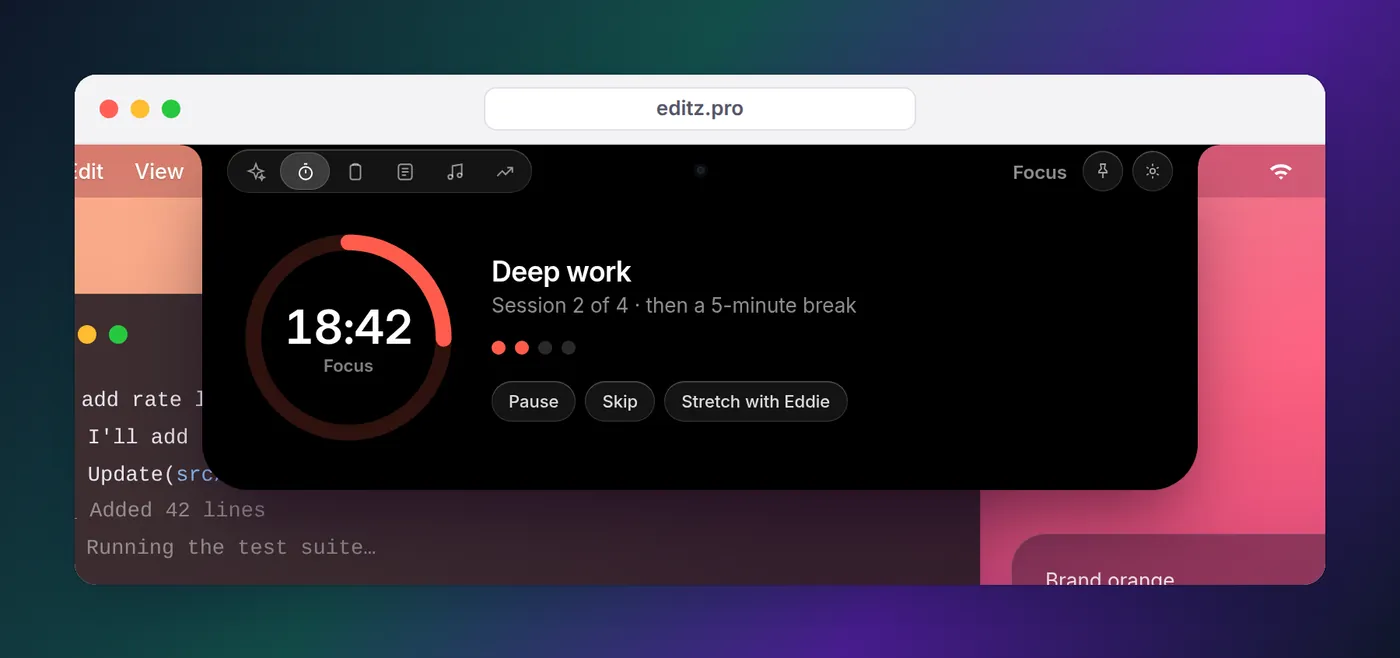
| Eddie | Suggests a pomodoro when you've been heads-down with no timer running, shows the countdown beside the notch, and walks you through five animated desk stretches for your neck, shoulders, wrists and chest on the break | Stretches are in the Mac app; its reminders follow the pomodoro, not a separate 20-20-20 timer; at most one nudge an hour, and "quiet today" turns them off |
| Clock app | Built-in Mac timers with names and sounds, reachable from the menu bar clock | You start each countdown yourself |
| A terminal loop | A repeating notification every 20 minutes, below | Stops when you close the terminal |
Eddie is our notch app for keeping an eye on AI coding agents on a Mac or Windows PC, and on a Mac the pomodoro and stretches live in the same place as your agents' status, so the break reminder shows up where you're already looking. It doesn't replace the 20-20-20 rule; use the agent's working time or one of the options below for that.
For a repeating 20-20-20 reminder with nothing to install, run a loop in a spare terminal tab. On a Mac it uses the same osascript notification command the Claude Code docs use; we checked the syntax but haven't run it on macOS:
# Every 20 minutes, show a notification. Stop it with Ctrl+C.
while true; do
  sleep 1200
  osascript -e 'display notification "Look at something 20 feet away for 20 seconds" with title "20-20-20"'
done
The first notification may appear as coming from Script Editor; if nothing shows, allow notifications for Script Editor in System Settings > Notifications. On Linux, notify-send (from the libnotify-bin package on Debian and Ubuntu) does the same job:
# Every 20 minutes, show a notification. Stop it with Ctrl+C.
while true; do
  sleep 1200
  notify-send '20-20-20' 'Look at something 20 feet away for 20 seconds'
done
Whatever you choose, keep the hourly break separate from the 20-second glance. The glance protects your eyes; the walk protects the rest of you. If you run agents through long sessions, watching them from the notch means you can step away without wondering whether one is waiting on you.
FAQ
What is the 20-20-20 rule?
Every 20 minutes, look at something at least 20 feet (about 6 meters) away for at least 20 seconds. The American Academy of Ophthalmology and the American Optometric Association both recommend it to ease digital eye strain, which comes partly from blinking less and focusing up close for long stretches.
How often should programmers take breaks?
The official guidance gives three rhythms: a 20-second look into the distance every 20 minutes (AAO and AOA), a five-minute break from computer tasks every hour to look away, stretch, get up or walk (OSHA's computer workstations guide), and a 15-minute rest for your eyes after two hours of continuous computer use (AOA).
Can looking at a screen all day damage your eyes?
According to the American Academy of Ophthalmology, no: screens don't permanently damage your eyes, and eye strain doesn't cause lasting damage. It can still be uncomfortable, with blurry vision, dry, achy or stinging eyes. If symptoms continue after you've adjusted your workspace, see an eye doctor.
Do blue light glasses help with eye strain?
The American Academy of Ophthalmology says to skip them, citing a lack of evidence that they work; several studies suggest they don't improve digital eye strain symptoms. It recommends the 20-20-20 rule and artificial tears for dry eyes instead.
What stretches can I do at my desk?
The NHS sitting and flexibility routines include a chest stretch, an upper-body twist, neck rotations, a neck stretch and an ankle stretch, all done in a sturdy chair without wheels. Hold each for about 5 seconds and repeat a few times. If you're not sure an exercise suits you, the NHS suggests checking with a GP or health professional first.