
The notch and the Mac
Watch Your AI Agents From the MacBook Notch
See what every Claude Code, Codex and Gemini CLI session is doing from your Mac's notch or menu bar: status, permission prompts and usage, compared.
On this page
The easiest way to watch AI coding agents on a Mac is to put their status where your eyes already go: the menu bar, and on a MacBook, the notch in the middle of it. A notch app like Eddie listens to each agent's hooks and shows every Claude Code, Codex, Cursor and Gemini CLI session as working, needs you or done, with a sound when one needs your permission. If you only want Claude Code usage numbers, its status line or a usage report covers that without any app.
This guide explains what you can actually see from outside the terminal, how each option gets that information, and how to set up the notch so you stop switching back to check on a session.
What "watching an agent" means
An agent session moves through a few states. Most time is lost in the gaps between them, when the agent is waiting on you and nothing tells you.
| State | What it means | Where the signal comes from |
|---|---|---|
| Working | The agent is thinking, editing or running tools | UserPromptSubmit and tool hooks, or the transcript growing |
| Needs you | A permission prompt or a question is waiting | The PermissionRequest hook, or Notification with permission_prompt |
| Done | The agent finished its reply | The Stop hook |
| Failed | The turn ended on an API error, such as a rate limit | The StopFailure hook |
| Idle | Finished a while ago, still waiting for your next prompt | Notification with idle_prompt, about 60 seconds after finishing |
On top of state, there are two things worth watching: usage, meaning tokens and what they would cost at API prices, and processes, such as the dev servers and browsers an agent started. Claude Code writes usage to session transcripts under ~/.claude/projects, and the processes are visible to ps and lsof like any others. The hooks reference documents every event in the table above.
Your options, compared
| Option | Every session at a glance | Instant "needs you" | Usage and cost | Visible from other apps | Setup |
|---|---|---|---|---|---|
| Eddie (notch app) | Yes, one row per session | Yes, the notch peeks out with a sound | Per session, project and day for Claude Code | Yes | One click per agent; Mac and Windows, cost on the Mac |
| Built-in notifications | No | After about six seconds away, in iTerm2, Ghostty and Kitty | No | Yes, as banners | None |
| Your own hooks | No | Yes, as a banner or sound | No | Yes | Edit settings.json |
| Claude Code's status line | The current session only | No | Estimated session cost, plus plan limits on Pro and Max | No, it lives in the terminal | A small script |
ccusage and similar CLIs | No | No | Detailed reports from local logs | No | Run a command |
A few honest notes on the alternatives. Choose the built-in notification if you run one session in iTerm2, Ghostty or Kitty: it's free and needs nothing. Choose your own hooks if you're on Linux, where Eddie isn't available, or on Windows and would rather not install an app; the notification guide has configs for both. Choose the status line if you mostly care about usage while you're already in the terminal; the status line docs list fields such as cost.total_cost_usd and, for Pro and Max subscribers, rate_limits.five_hour.used_percentage. Choose a usage CLI if you want a detailed report rather than a live view.
Where they all fall short is several sessions at once. Banners arrive one at a time and pile up in Notification Center; a status line only describes the terminal it's in. Seeing all your agents means one place that holds every session's current state, which is what the notch is good at.
Why the notch works for this
The notch is already dead space in the middle of your menu bar, it's on every Space and every full-screen app, and it's where your eyes land when you look up. That makes it a good place for status that's mostly quiet. When nothing is happening it should look like a normal notch. When something needs you, it should change shape enough to catch your eye, then go back once you've answered.
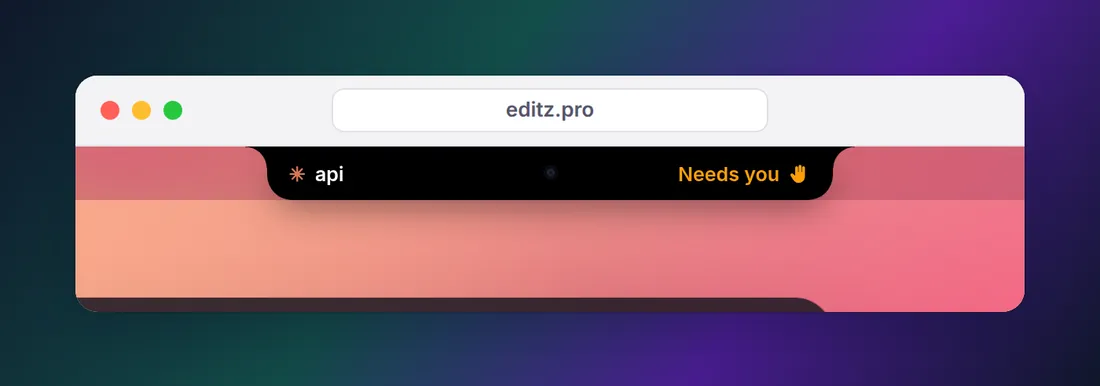
That's the same idea as Live Activities and the Dynamic Island on an iPhone, which is why notch apps are sometimes sold as a "Dynamic Island for Mac". Most of them focus on music, files and calendar. Our guide to notch apps for developers covers that wider category; this guide is about agents.
How a menu bar app knows what Claude Code is doing
There's no magic, and you can build a crude version yourself. Claude Code runs hooks at each state change, so a few lines in ~/.claude/settings.json can write every change to a file:
{
  "hooks": {
    "UserPromptSubmit": [
      {
        "hooks": [
          { "type": "command", "command": "jq -c '{time: (now | todate), state: \"working\", session: .session_id, project: .cwd}' >> \"$HOME/.claude/agent-status.jsonl\"" }
        ]
      }
    ],
    "PermissionRequest": [
      {
        "hooks": [
          { "type": "command", "command": "jq -c '{time: (now | todate), state: \"needs you\", session: .session_id, project: .cwd, tool: .tool_name}' >> \"$HOME/.claude/agent-status.jsonl\"" }
        ]
      }
    ],
    "Stop": [
      {
        "hooks": [
          { "type": "command", "command": "jq -c '{time: (now | todate), state: \"done\", session: .session_id, project: .cwd}' >> \"$HOME/.claude/agent-status.jsonl\"" }
        ]
      }
    ]
  }
}
Run tail -f ~/.claude/agent-status.jsonl in a spare terminal and you'll see a line each time a session starts working, asks for permission or finishes. The PermissionRequest hook prints nothing, so the permission prompt still appears as usual. You need jq, which you can install with brew install jq.
A real app does the same thing with more care. It uses a tiny helper instead of jq, so the hook returns in milliseconds. It also reads the transcripts, because hooks alone miss some changes: pressing Esc to interrupt Claude fires no Stop hook, and sessions you started before connecting never sent a UserPromptSubmit. Finally, it clears "needs you" once the session moves on, which a log file can't do.
Setting up Eddie
Eddie is our notch app for exactly this. Setting it up on a Mac:
- Install it, open Settings and connect Claude Code. It takes one click: Eddie adds its hooks to
~/.claude/settings.jsonand saves a backup of the file first. - Restart Claude Code sessions that were already open, so they load the new hooks.
- Connect Codex, Cursor or Gemini CLI the same way if you use them. For Codex, run
/hooksonce inside Codex and trust the new hook; Codex skips hooks you haven't reviewed, as its hooks docs explain. - Press ⌃⌥A from any app to open the agents list, or just leave it closed and let it tap you.
Prefer to edit config files yourself? Settings includes a manual setup guide with a ready-made prompt you can paste into the agent, and disconnecting an agent removes the hooks again. You can check exactly what was added with /hooks in Claude Code.
What you see for each agent
How much a notch app can show depends on what each agent reports through its hooks. This is the compatibility table from our home page:
| Agent | Live status | "Needs you" alerts | Cost | CPU, RAM, ports |
|---|---|---|---|---|
| Claude Code (terminal, VS Code, Cursor terminal) | Yes | Yes | Yes | Yes |
| Codex (CLI, IDE, ChatGPT app) | Yes | Yes, after you trust the hook in /hooks | Not yet | Yes |
| Cursor's agent | Working and done | No, Cursor doesn't report approvals | No | CLI only |
| Gemini CLI | Yes | Yes | No | Yes |
| Claude desktop app, Code tab | Yes, from its saved transcripts | Questions only | Yes | Yes |
| opencode, Aider or any program you add | Busy or idle | No | No | Yes |
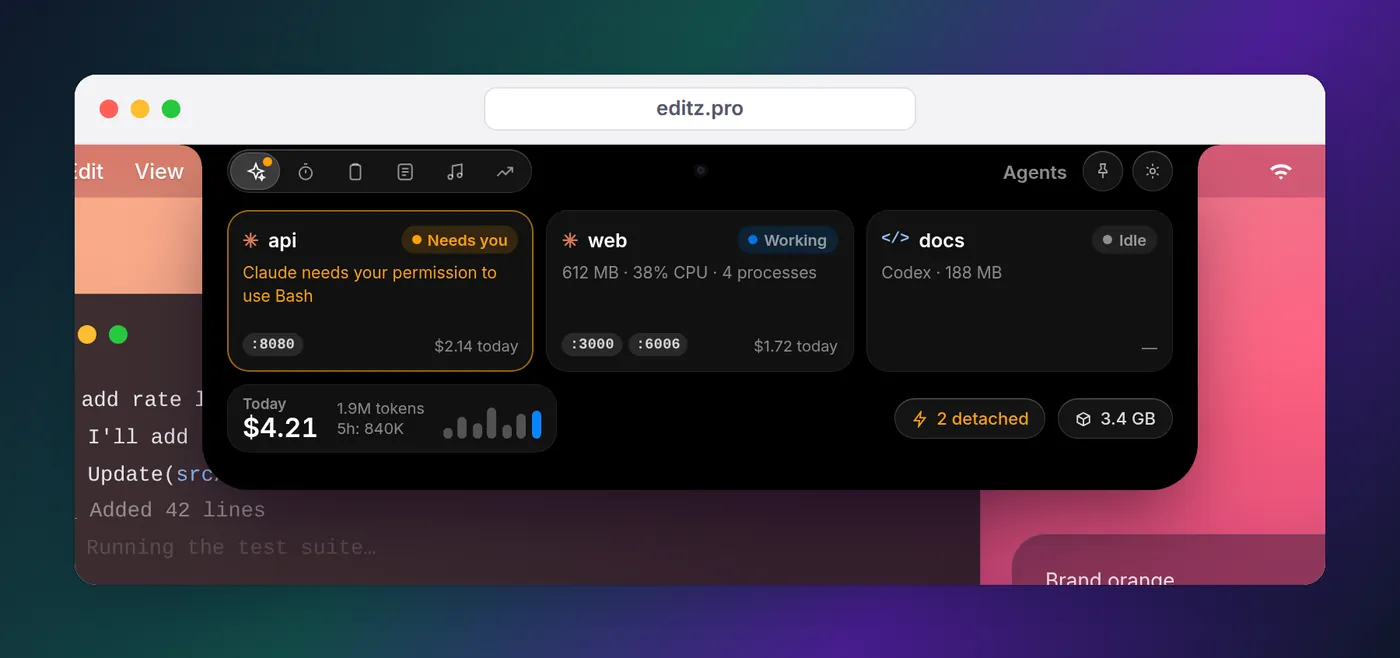
The Claude desktop app is the odd one out. The app follows its Code tab through the session transcripts it saves on your Mac, with nothing to connect. Permission prompts never reach those transcripts, so it can show working, done and questions Claude asks you, but not a pending approval.
Usage and cost from the menu bar
For Claude Code, the app reads token counts from the local session logs and shows API-equivalent cost per session, per project and per day. No API key is needed, and nothing is uploaded.
Keep in mind what that number means. It's what the same tokens would cost at Anthropic's list API prices. On a Pro or Max plan you aren't billed per token, so treat it as a measure of which sessions are heavy, not as your bill. Our guides on how to check Claude Code token usage and what Claude Code costs go deeper, and the status line guide shows how to put your plan's 5-hour limit in the terminal.
The processes agents leave behind
Agents start things: next dev on port 3000, a Vite server, a headless Chrome for tests. When a terminal closes, some of those keep running in the background and hold their ports. The agents tab shows each agent's process tree with memory, CPU and ports, flags dev servers whose parent is gone, and stops them in two clicks. If you'd rather do it by hand, our guide to finding and killing leftover dev servers shows the lsof and kill commands.
Privacy
Watching agents shouldn't mean sending your work somewhere. Hooks run locally and write to local files, and the app keeps everything on your Mac, with no account, no cloud and no analytics. Its hooks record what the notch needs to show, such as the start of your prompt and the agent's latest reply, and the privacy page lists every file it reads and the few things that leave your Mac: license checks, update checks and services you connect yourself.
Not on a Mac?
On a Mac, Eddie needs macOS 14 or later. On Windows 10 or 11, Eddie for Windows shows the same working, needs you and done states at the edge of your desktop; install it from the Microsoft Store and activate it with the same key. There's no Linux version, so on Linux the hooks are the answer: see Claude Code notifications on Linux, on Windows if you'd rather use hooks there, and on your phone for when you're away from the desk entirely. If you run several sessions at once on any OS, running Claude Code sessions in parallel has tips for keeping them apart.
FAQ
Is there a Claude Code usage monitor for the Mac menu bar?
Yes. A notch app such as Eddie sits in the middle of the menu bar and shows each Claude Code session's status and API-equivalent cost, read from Claude Code's local logs. If you only want numbers inside the terminal, Claude Code's status line can show the session's estimated cost and, on Pro and Max plans, how much of the 5-hour and 7-day limits you've used.
Can I see when Claude Code needs permission without watching the terminal?
Yes. Claude Code fires a PermissionRequest hook the moment it asks for permission, and a Notification hook with the permission_prompt type after the prompt has waited about six seconds. A hook can turn either into a desktop notification, and a notch app can turn it into a status that stays visible until you answer.
Does a notch app work on a Mac without a notch?
Eddie does. On an iMac, Mac mini, Mac Studio or an external display it draws a slim notch of its own in the middle of the menu bar, and you can choose which display it lives on.
Can it show Codex, Cursor and Gemini CLI too?
Through their own hooks, yes, with limits that depend on what each agent reports. Codex and Gemini CLI report permission prompts; Cursor only reports when its agent starts and stops working. The compatibility table above lists exactly what Eddie shows for each one.
Is the cost shown what Anthropic bills me?
Not on a Pro or Max plan. Tools that read Claude Code's local logs show API-equivalent cost at Anthropic's list prices, which is useful for seeing which sessions are heavy. Subscription plans aren't billed per token.
Does watching agents this way send my code anywhere?
It doesn't have to. Hooks run on your machine and write to local files. Eddie keeps everything on your Mac, with no account and no analytics; the only network calls are license checks, update checks and services you connect yourself.