
Focus and health
Pomodoro for Developers Who Work With AI Agents
A developer pomodoro routine for the age of coding agents: 25-minute focus blocks, agent check-ins on the breaks, and only real blockers allowed to interrupt.
On this page
A developer pomodoro is the classic Pomodoro Technique, 25 minutes of focused work and then a short break, with one change for anyone running AI coding agents: you don't check on agents during the 25 minutes, only at the breaks. Start agents on their tasks, spend the pomodoro on work only you can do (reviewing, specifying, designing), and let a session interrupt you only when it is truly blocked on you, such as a permission prompt. Every four pomodoros, take a longer break of 15 to 30 minutes.
The technique's rules here come from Francesco Cirillo's own paper and the official Pomodoro Technique site, and the agent settings from the Claude Code docs, checked on October 3, 2026. Pomodoro® is a registered trademark, and this post isn't affiliated with Cirillo or his company.
What the Pomodoro Technique actually is
Most people know it as "a 25-minute timer", but the official site describes it as a complete system: daily planning, interruption management and effort estimation, with the timer as only the starting point. The core rules from Cirillo's paper:
| Rule | What it says |
|---|---|
| One pomodoro | 25 minutes of work on one task, ended by the timer |
| Short break | 3 to 5 minutes after each pomodoro; stop working even if you're nearly done |
| Long break | 15 to 30 minutes after every four pomodoros |
| A pomodoro is indivisible | There's no half pomodoro. If one is truly interrupted, it's void and you start a new one |
| Internal interruptions | When you feel the urge to do something else, write it down and keep going |
| External interruptions | Inform the person, negotiate a later time, and call them back as agreed |
| Plan and record | Pick the day's tasks from a list in the morning, and record finished pomodoros to learn how long things really take |
The break matters as much as the work. Cirillo's paper says the short break is time to disconnect, so your mind can take in what you just did; working "just a few more minutes" through it defeats the purpose.
Why AI agents break the classic pomodoro
The technique was designed around a person doing one task. Working with coding agents adds a stream of small events that each invite a context switch:
- an agent asks permission to run a command,
- an agent finishes a turn and waits for your next prompt,
- an agent asks you a question halfway through,
- a test run in one session fails while you're reading another session's diff.
Treat every one of those as urgent and your 25 minutes become a series of two-minute fragments. Ignore all of them and an agent can sit blocked on a permission prompt for the whole pomodoro, which wastes its time instead of yours. You need a rule for which events are allowed through.
The useful distinction is between blocked and done. A blocked agent can't make progress until you act. A done agent has finished and is merely idle. Blocked is worth a short interruption; done can wait for the break.
A pomodoro routine for agent work
Before the timer starts
Spend the first minutes of the day, or of each set of four, the way Cirillo suggests: choose the tasks. With agents, that means deciding which tasks go to agents and which you'll do yourself. Then start the agents first, with prompts specific enough to run without you. Claude Code's background sessions suit this: claude --bg "add pagination to the orders API" starts a session that keeps running without a terminal, and claude agents shows them all later. Give parallel sessions their own worktrees so they don't collide; our guide to running several Claude Code sessions shows how.
During the 25 minutes
Pick a task that is yours: reviewing the diff an agent produced last round, writing the spec or tests for the next task, reading code you need to understand, or thinking through a design. Close the terminal tabs you don't need. Agents running in the background don't count as your pomodoro; your pomodoro is the one task you chose.
If a session becomes blocked, treat it like Cirillo's internal interruption: answer it as briefly as you can (approve, deny, or answer the question), make a mark if you're tracking interruptions, and return to your task. If it needs more than a minute of thought, tell it to wait and add it to your list for the break.
At the short break
Now check every session. Read what finished, queue the next prompts, approve anything waiting. Then step away from the screen for what's left of the break, which is the part most developers skip. A few minutes looking out a window or stretching is the point of the break; our desk stretches guide has a short routine taken from NHS and OSHA guidance.
At the long break
Every four pomodoros, take 15 to 30 minutes away. It's a natural moment to review the bigger picture: which agent tasks are done, which need another pass, and what goes into the next set.
| Event | During a pomodoro | At the break |
|---|---|---|
| Agent needs permission | Answer it quickly, then go back | Handle anything you postponed |
| Agent asks a question | Answer if it's quick; otherwise note it | Answer in full |
| Agent finished | Leave it | Review the result and send the next prompt |
| Tests failed in a session | Leave it unless it blocks your task | Read the failure and decide |
| A new idea for a task | Write it down | Add it to the list |
Cut interruptions before they start
The best interruption is the one that never happens. Two settings reduce how often an agent stops to ask.
First, allow the safe commands you'd approve anyway. Claude Code's permission rules let a project pre-approve commands, so routine test and build runs don't prompt you:
{
  "permissions": {
    "allow": [
      "Bash(npm run test *)",
      "Bash(npm run lint)",
      "Bash(git diff *)"
    ],
    "deny": [
      "Bash(git push *)"
    ]
  }
}
Adjust the list to your project, and keep anything destructive or outward-facing, like pushing or deploying, behind a prompt. Our guide to Claude Code permission modes covers the broader options, including when skipping prompts is safe.
Second, make only blocking events audible. Claude Code's Notification hook can play a sound for permission prompts and for background sessions that need input, and nothing for routine completions. On a Mac:
{
  "hooks": {
    "Notification": [
      {
        "matcher": "permission_prompt|agent_needs_input",
        "hooks": [
          {
            "type": "command",
            "command": "afplay /System/Library/Sounds/Glass.aiff"
          }
        ]
      }
    ]
  }
}
permission_prompt fires after a permission prompt has waited about six seconds, and agent_needs_input fires while agent view is open and a background session needs you. If you want an alert the instant Claude asks, use the PermissionRequest hook instead; the waiting-for-input guide compares the two and has Linux and Windows versions.
Pomodoro timers on a Mac
| Timer | What you get | Good to know |
|---|---|---|
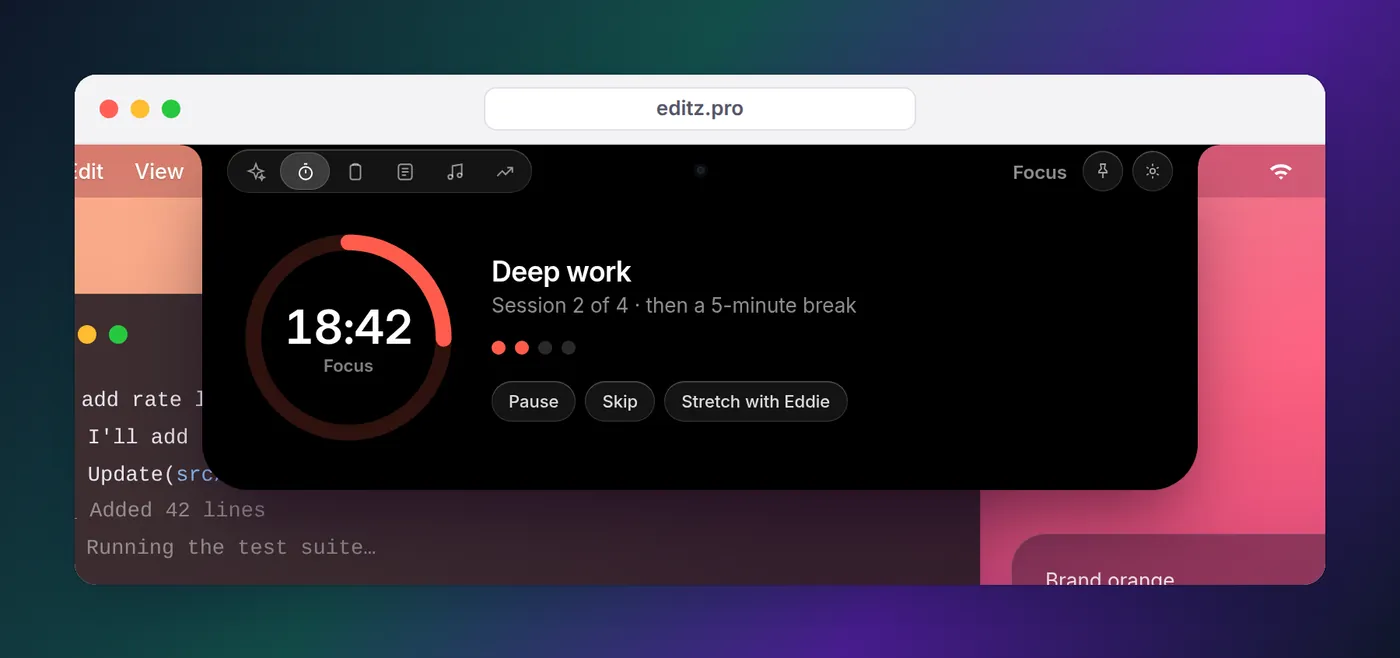
| Eddie | A pomodoro countdown beside the notch, a nudge when you've been heads-down with no timer running, and five animated desk stretches on the break; the same notch shows which agents need you | Mac and Windows (Ctrl+Alt+P starts the pomodoro on Windows); the stretches are in the Mac app; a timer and break coach, not Cirillo's full planning sheets |
| Clock app | Built-in timers with names and sounds, reachable from the menu bar's clock widget | Counts down even if the Mac sleeps; one-off timers, no cycles |
| Official Pomodoro timers | Free browser, Windows and PWA timers from Cirillo's site | Separate from your agent tools |
| A Focus | Silences notifications except from the people and apps you allow | Pairs with any timer; not a timer itself |
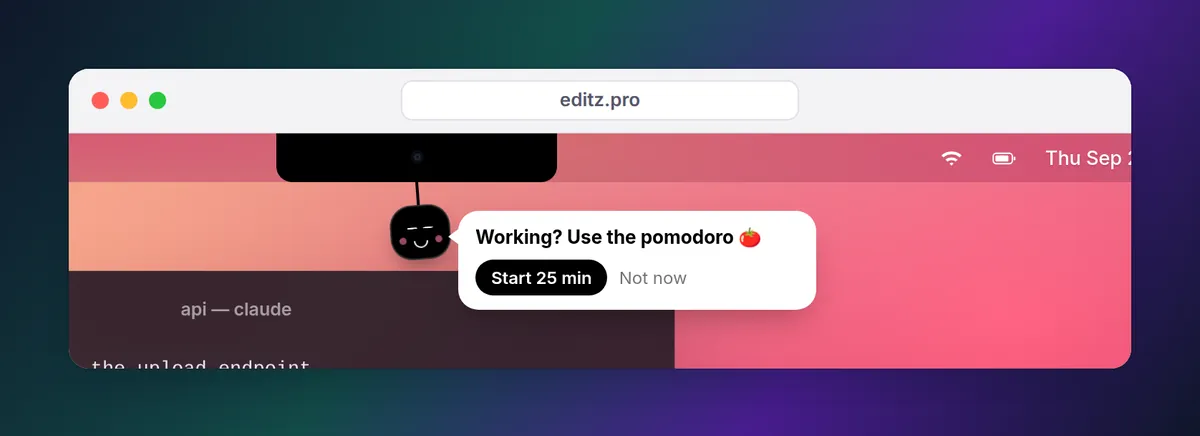
Eddie fits the routine above because the timer and the agents live in the same place. When you've been working steadily with no timer, Eddie, the mascot, drops out of the notch and suggests a pomodoro, at most once an hour, and "quiet today" turns that off in one click. Start one and the countdown sits beside the notch, next to the same agent status that tells you whether any session is working, needs you or is done, so you can see at a glance whether anything is blocked without opening a terminal. When the break comes, Eddie walks you through stretches for your neck, shoulders, wrists and chest.
If you'd rather not install anything, Apple's Clock app handles the timing: open Timers, set 25 minutes and click Start, or click the time in the menu bar to reach the Clock widget. Pair it with a Focus that allows only your terminal's notifications, so agent alerts get through and everything else waits.
Keep a record, including the agent work
The part of the technique most people drop is the record. Cirillo's method has you estimate how many pomodoros a task will take, mark each one you finish, and compare at the end of the day, so your estimates improve. With agents in the loop, the record becomes more useful, not less, because it answers a question you can't answer from memory: which kinds of tasks are worth handing off?
Keep it simple. Next to each task on today's list, note how many of your pomodoros it took and how many agent rounds (prompt, wait, review, correct) it needed before you merged it. After a week, patterns show up. A refactor that took one prompt and one review was a good handoff. A feature that took five rounds of corrections and three of your pomodoros reviewing them may have been faster to write yourself, or needed a better spec up front. That's the kind of effort estimation the official site means when it calls the technique a system rather than a timer.
Should you change the 25 minutes?
The 25-minute pomodoro is a convention, not a law. In his paper, Cirillo describes teams experimenting with lengths and calls 20 to 35 minutes the ideal range, 40 at most; he also warns against shortening breaks because you're under pressure. If your agent tasks routinely take 40 minutes, that's not a reason to stretch your pomodoro to match: the pomodoro measures your attention, not the agent's runtime. Run two pomodoros of your own work while the agent runs, and check it at the break between them.
What doesn't change is the core habit. One task at a time, a timer you respect, breaks you actually take, and a rule that only a blocked agent gets to interrupt you.
FAQ
What is pomodoro?
The Pomodoro Technique is a time management method created by Francesco Cirillo: you work on one task for 25 minutes, take a short break, and after four of those work blocks take a longer break of 15 to 30 minutes. Each block is called a pomodoro, Italian for tomato, after the kitchen timer Cirillo used.
How long is a pomodoro?
The classic pomodoro is 25 minutes of work followed by a break of 3 to 5 minutes, so about 30 minutes in total. Every four pomodoros you take a longer break of 15 to 30 minutes. Cirillo's own paper discusses other lengths and calls 20 to 35 minutes the ideal range, 40 at most.
Is there a pomodoro timer for the Mac menu bar?
Several. Eddie puts a pomodoro countdown beside the MacBook notch and walks you through desk stretches on the break. Without installing anything, the Clock app on recent macOS versions has timers you can reach by clicking the time in the menu bar.
What should I do when an AI agent finishes in the middle of a pomodoro?
Nothing until the break. A finished agent isn't blocked, so it can wait a few minutes. Only an agent that is waiting on you, such as a permission prompt, is worth a brief interruption, and even then answer it and go straight back to your task.
Should I start a pomodoro while an agent works on a long task?
Yes, that's the ideal time. Dispatch the task, then spend the pomodoro on work only you can do, such as reviewing the last diff, writing the next spec or thinking through a design. You'll check the agent's result at the break with fresh eyes.