
Usage, limits and cost
Claude Code's 5-Hour Limit Explained: How It Works and When It Resets
How the Claude Code 5-hour limit works on Pro and Max, when it resets, how it relates to the weekly limit, and what to do when you hit it.
On this page
The Claude Code 5-hour limit is the session allowance on Claude's Pro, Max and Team plans: your usage is metered in a window that resets every five hours, and when it runs out Claude Code stops with a message like You've hit your session limit · resets 3:45pm. The limit resets at that time, it's shared with claude.ai and the desktop app, and a separate weekly limit sits on top of it. Anthropic doesn't publish a fixed number of tokens or messages per window.
This guide is based on Anthropic's usage limit errors reference, the Claude Code cost docs, the Pro and Max plan articles and claude.com/pricing, all checked on October 3, 2026.
How the 5-hour window works
Anthropic describes the limit as a "rolling five-hour session window." Three things about it matter in practice:
- It's a time window, not a daily quota. Whatever you use counts against the current window, and the window resets every five hours. The usage credits article puts it as "your plan's included usage limit will reset every five hours once you reach it."
- It's shared across Claude. Claude Code in the terminal, Claude Code in your IDE, claude.ai and the desktop app all draw from one pool, as Anthropic's usage and length limits article states. A long chat in the browser leaves less for the terminal.
- The reset time is shown, so you don't have to work it out. The official pages don't spell out exactly when a window starts, so don't try to compute it from memory. Read it from the limit message,
/usage, Settings > Usage on claude.ai, or your status line.
The usage itself isn't a count of prompts. Anthropic lists what changes how fast you use it: message length, attachment size, the current conversation's length, tool use, the model, the effort level and multi-step tasks. In Claude Code the biggest of these is conversation length, because every request resends the whole conversation.
How many tokens do you get per 5 hours?
Anthropic doesn't publish one. The pricing page FAQ says there's "no fixed message count" because usage depends on "the length and complexity of your conversations, the model you choose, and the features you use." Any exact token number you see quoted elsewhere is someone's measurement, not an official limit, and it can change.
What Anthropic does publish is how the plans compare:
| Plan | Per 5-hour session | Weekly limit |
|---|---|---|
| Free | Baseline (no Claude Code) | Not stated |
| Pro | At least 5x Free | Yes, across all models |
| Max 5x | 5x Pro | Yes, across all models |
| Max 20x | 20x Pro | Yes, across all models |
| Team, Standard seat | More than Pro | Yes |
| Team, Premium seat | 5x a Standard seat | Yes |
Anthropic also reserves the right to limit usage "in other ways, such as weekly and monthly caps or model and feature usage." On Max, the plan table lists Fable at up to 50% of the weekly limit; on Pro, Fable runs on usage credits only.
The weekly limit
On top of the 5-hour window, Pro and Max have a weekly limit that applies across all models. According to the plan articles, it resets "at a fixed time each week that is assigned to your account," and that day and time stay the same no matter when you start using Claude or when you subscribed. Settings > Usage shows the next weekly reset.
The two limits count at the same time. The errors reference warns that "a single burst of heavy activity, such as a large workflow fanout, can exhaust the weekly allowance before the session window resets." So a fresh 5-hour window doesn't help if the week is used up.
What each limit message means
Claude Code shows one of these when a limit stops you:
| Message | What ran out | Does switching models help? |
|---|---|---|
You've hit your session limit · resets 3:45pm | The 5-hour window | No, it's shared across models |
You've hit your weekly limit · resets Mon 12:00am | The weekly allowance | No |
You've hit your Opus limit · resets 3:45pm | A model-specific limit | Yes, switch to a non-Opus model with /model |
You've hit your Sonnet limit · resets 3:45pm | A model-specific limit | Yes, switch to a non-Sonnet model |
You've hit your individual spend limit (or org or team budget) | A usage-credits spend cap | No, raise the cap or wait for the reset |
Before you run out, Claude Code can warn you with a line such as You've used 85% of your session limit · resets 3:45pm. If you switch models after an Opus or Sonnet limit, expect the next request to be expensive: each model has its own prompt cache, so it re-reads the whole conversation with no cache hits.
How to check your limit and reset time
You have four places to look:
/usagein Claude Code shows plan usage bars and when each limit resets. On Pro, Max, Team and Enterprise it also breaks down what used your allowance (skills, subagents, MCP servers, long context, cache misses), as the costs docs describe. It's computed from this machine's history, so chats on claude.ai and other computers aren't in the breakdown.- Settings > Usage on claude.ai shows the current session's usage with the time remaining, and your weekly limits, as described in Anthropic's usage limit best practices.
- The Claude Desktop app has a usage ring next to the model picker.
- Your status line can show both limits all the time. Claude Code passes
rate_limits.five_hour.used_percentageandrate_limits.five_hour.resets_at(plus the same forseven_day) to your status line script on Pro and Max, after the first response of a session.
Here's a status line that prints both percentages and the 5-hour reset time. Save it as ~/.claude/statusline.sh and run chmod +x ~/.claude/statusline.sh. It needs jq 1.6 or later:
#!/bin/bash
# Pro and Max only: 5-hour and weekly limit usage, with the 5-hour reset time
input=$(cat)
MODEL=$(echo "$input" | jq -r '.model.display_name')
LIMITS=$(echo "$input" | jq -r '
  [ (.rate_limits.five_hour // empty
      | "5h \(.used_percentage | floor)% (resets \(.resets_at | strflocaltime("%H:%M")))"),
    (.rate_limits.seven_day // empty
      | "7d \(.used_percentage | floor)%") ]
  | join(" · ")')

if [ -n "$LIMITS" ]; then
  echo "[$MODEL] $LIMITS"
else
  echo "[$MODEL]"
fi
Then point Claude Code at it:
{
  "statusLine": {
    "type": "command",
    "command": "~/.claude/statusline.sh"
  }
}
With sample input it prints [Opus] 5h 73% (resets 23:32) · 7d 41%. The status line docs note that the status line re-runs when a window reaches its resets_at time, so the numbers clear on their own. Our status line guide has seven more examples.
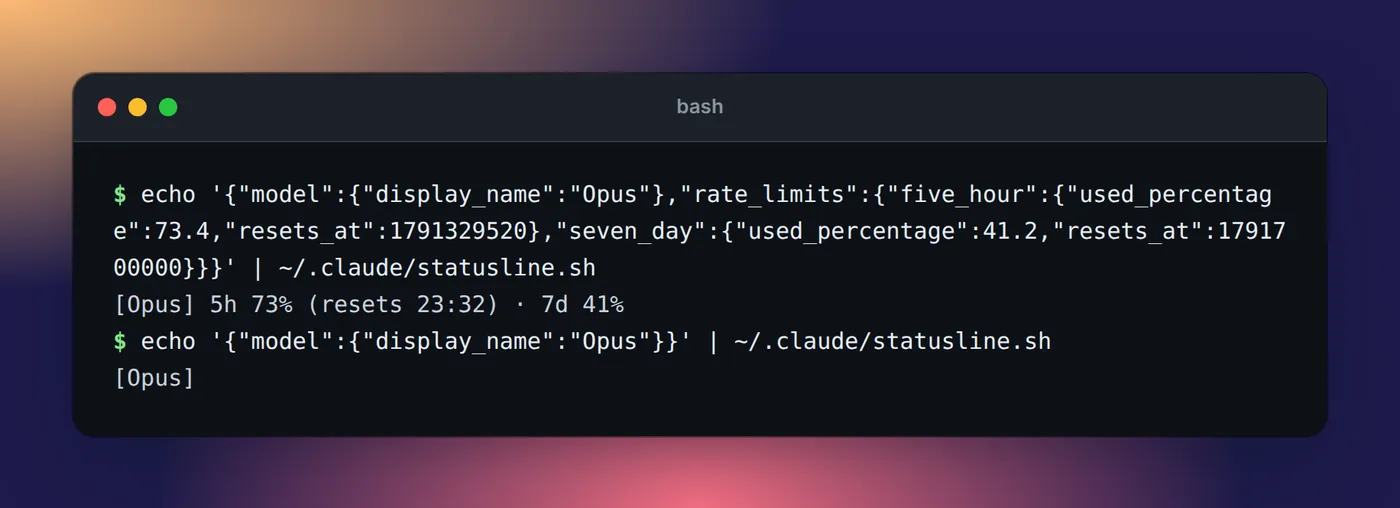
rate_limits it shows both limits, without them just the model.What to do when you hit the limit
You have five options, from free to paid.
1. Let Claude Code wait and continue
On Claude Code v2.1.234 or later, signed in with a Claude subscription, an interactive session waits in place and continues the interrupted task after the reset. You'll see:
Usage limit reached · limit resets 3:45pm
Continuing automatically at 3:45pm · esc to cancel
Keep the session open. Press Esc at an empty prompt to cancel. The interactive mode docs list the cases where it doesn't start on its own, such as a weekly reset more than 24 hours away; there, /rate-limit-options offers a "Wait here, then continue automatically" row. To turn the behavior off, set autoContinueAtUsageLimit to false:
{
  "autoContinueAtUsageLimit": false
}
The continued task still asks for permissions as usual, so it can stop on a prompt while you're away. That's a good moment for a notification when Claude Code needs you.
2. Switch models, for a model-specific limit only
After You've hit your Opus limit, /model sonnet keeps you working. After a session or weekly limit, switching does nothing.
3. Turn on usage credits
Pro and Max can keep going past the limit at standard API rates with usage credits. Run /usage-credits to open the settings, set a monthly spend cap, and add funds. Credits are billed separately from the subscription, and the 5-hour reset timing doesn't change.
4. Upgrade
Max 5x ($100 a month) and Max 20x ($200 a month) multiply Pro's per-session allowance by 5 and 20. Upgrades take effect right away, with unused time credited. See what Claude Code costs on each plan.
5. Use an API key for a sprint
Anthropic's Pro and Max guide suggests a Claude Console account for "intensive coding sprints." API usage has no 5-hour window; you pay per token instead.
Can you reset or bypass the 5-hour limit?
Not with a command or a setting. Anthropic occasionally gives eligible plans a one-time limit reset that sets either the 5-hour or the weekly limit back to full. You use it from Settings > Usage on the web or in Claude Desktop; the button isn't available in Claude Code in the terminal or IDE, but the reset applies there too.
Every other "bypass" is one of the paid options above. Starting a new session, logging out and back in, or switching models (for a session limit) doesn't restore anything, because the limit belongs to your account, not to the session.
Why the limit runs out faster than you expect
The costs docs list the usual causes:
- Long context. Each request carries the whole conversation, so a one-line question late in an all-day session draws usage for the entire history.
- Cache misses after a break. On a subscription the prompt cache lasts an hour. Your first message after a longer break reprocesses the full context.
- Subagents, workflows and agent teammates. Each one sends its own requests.
- Scheduled tasks, cross-session messages and goal check-ins. They can start turns while the session sits idle.
- Compaction.
/compactreads the whole conversation it summarizes;/clearcosts nothing. - The model. Opus 5.5 is the default model on Pro and Max, and Anthropic's Claude Code usage guide notes that Opus uses "meaningfully more of your quota" than Sonnet.
Our list of ways to reduce Claude Code token usage has a fix for each.
If you run several sessions on a Mac, it helps to see which ones are heavy before the window runs out. Eddie, our notch app, shows tokens and API-equivalent cost for each Claude Code session, project and day, read from local logs. It doesn't show your plan's remaining percentage; the status line above does that.
FAQ
How often does the Claude Code limit reset?
The session limit resets every five hours, and paid plans also have a weekly limit that resets at a fixed day and time assigned to your account. The exact reset time is shown in the limit message, in /usage and in Settings > Usage on claude.ai.
How many tokens do you get per 5 hours in Claude Code?
Anthropic doesn't publish a token or message count. It says usage depends on conversation length, the model, effort level and features used. What it does publish is the ratio between plans: Pro gives at least 5x Free's usage per 5-hour session, and Max gives 5x or 20x Pro's.
How do I resume Claude Code after the limit resets?
Keep the session open. On Claude Code v2.1.234 or later, signed in with a Claude subscription, it waits and continues the interrupted task on its own after the reset. If you cancelled the wait, just send a prompt once the reset time has passed, or start the wait again from /rate-limit-options.
Can I reset the Claude Code limit manually?
There's no command that resets it. Anthropic occasionally gives eligible plans a one-time limit reset, used from Settings > Usage on the web or in Claude Desktop, not from Claude Code. Otherwise your options are waiting, usage credits at API rates, a bigger plan, or an API key.
When does the Claude Code weekly limit reset?
At a fixed time each week that Anthropic assigns to your account. It stays the same regardless of when you start using Claude or when your subscription began. Settings > Usage shows your next weekly reset.
How much Claude Code usage do you get with Pro?
Pro has the smallest allowance of the paid plans: at least five times the Free plan's usage per 5-hour session, plus a weekly limit, shared between Claude Code, claude.ai and the desktop app. Max 5x and Max 20x multiply Pro's per-session allowance by 5 and 20.