
Usage, limits and cost
Claude Code Status Line: Setup and 8 Statusline Examples
Set up the Claude Code status line in two minutes, see every field it receives, and copy 8 statusline examples for context, cost, git and plan limits.
On this page
The Claude Code status line is a bar at the bottom of the session that runs a script you choose and shows whatever it prints. Claude Code sends the script JSON about the session (model, context use, cost, git worktree, and on Pro and Max your 5-hour and weekly limits), so a few lines of Bash give you a live dashboard. The quickest setup is /statusline plus a description of what you want; the eight statusline examples below are complete scripts you can paste instead.
Everything here follows the official status line docs, checked on October 3, 2026. Each script below was run against sample JSON with Bash and jq 1.7 on Linux; they use nothing macOS-specific, but they haven't been run on a Mac.
Set up the status line
The quick way: /statusline
Type /statusline and describe what you want:
/statusline show model name, context percentage with a progress bar, and session costClaude Code writes a script in ~/.claude/ and updates your settings. Approve the file edits when it asks. Run /statusline with no arguments to build one from your shell prompt, and /statusline remove it to turn it off.
By hand
- Save a script as
~/.claude/statusline.sh(any of the examples below). - Make it executable with
chmod +x ~/.claude/statusline.sh. - Add the
statusLinesetting:
{
  "statusLine": {
    "type": "command",
    "command": "~/.claude/statusline.sh",
    "padding": 0
  }
}
Claude Code reloads settings automatically and runs the new command right away. The Bash examples need jq (brew install jq on macOS, your package manager on Linux). Optional fields: padding adds spaces of indentation, refreshInterval re-runs the command every N seconds (minimum 1) for clocks and other time-based output, and hideVimModeIndicator hides the built-in -- INSERT -- text if your script shows the vim mode itself. A project's .claude/settings.json can set its own status line too.
What data the script receives
The script gets one JSON object on stdin each time it runs. The fields you'll use most:
| Field | What it holds |
|---|---|
model.display_name, model.id | Current model, such as Opus and claude-opus-5-5 |
workspace.current_dir, workspace.project_dir | Current folder and the folder Claude Code started in |
context_window.used_percentage | How full the context window is (input tokens only); can be null early on |
context_window.context_window_size | 200000, or 1000000 for models with a 1M window |
cost.total_cost_usd | Estimated session cost at API list price; resets on /clear |
cost.total_duration_ms | Wall-clock time of the session |
cost.total_lines_added, cost.total_lines_removed | Lines changed this session |
rate_limits.five_hour.used_percentage, .resets_at | Pro and Max: 5-hour limit used, and reset time in epoch seconds |
rate_limits.seven_day.used_percentage, .resets_at | Pro and Max: weekly limit used, and reset time |
prompt_cache.warm, .hit_ratio, .expires_at | Whether the prompt cache is warm, its hit ratio, when it goes cold (v2.1.251+) |
effort.level | low to max; absent on models without effort |
session_id, session_name | Unique ID and the session's name or AI title |
pr.number, pr.review_state | Open pull request for the branch, when there is one |
worktree.name, worktree.branch | Present in a worktree session |
transcript_path, version | Path to the session transcript and the Claude Code version |
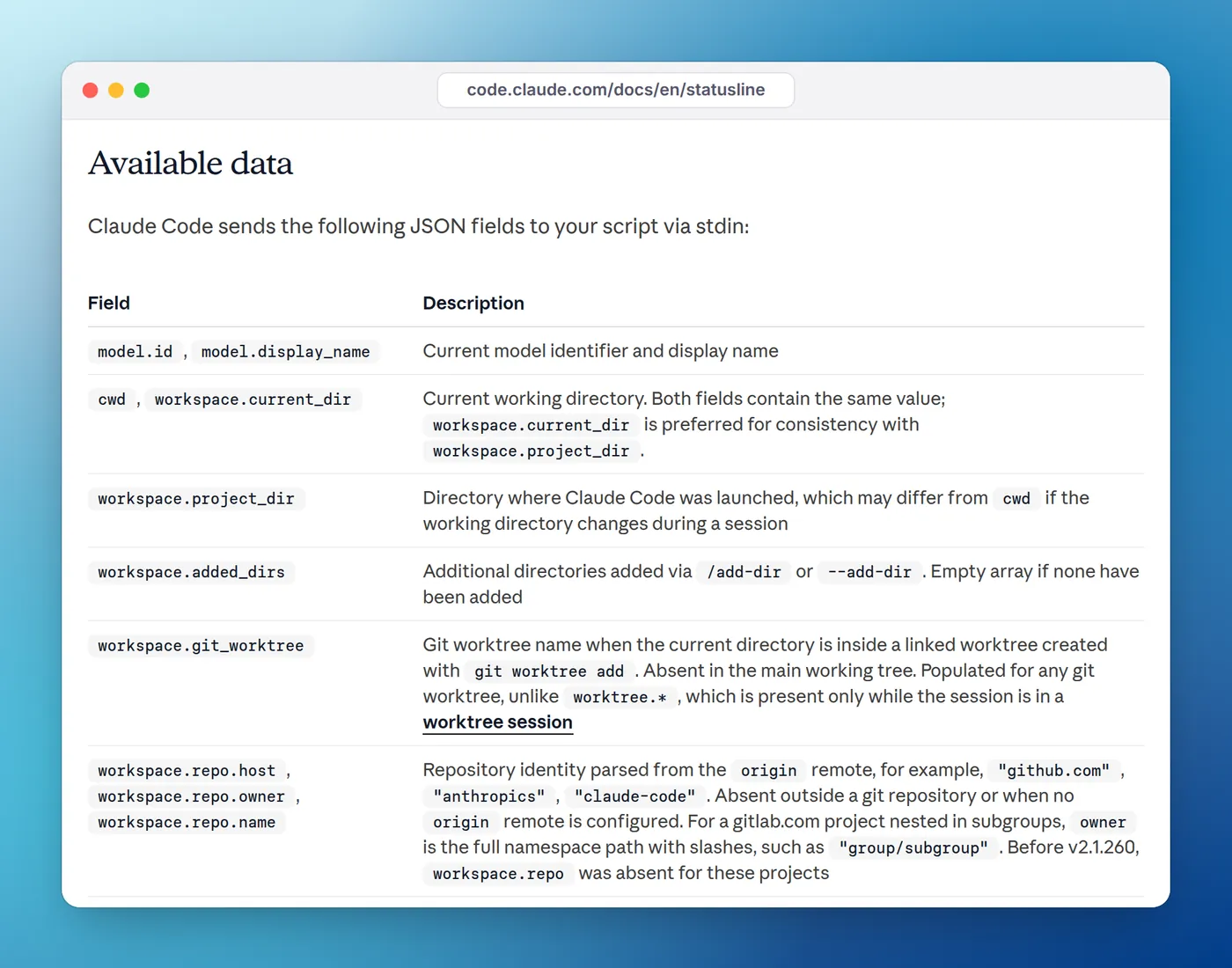
Several fields are missing until they apply: rate_limits appears only for Pro and Max subscribers (or behind a gateway with a spend limit) and only after the first response; pr, worktree, effort and vim appear only when relevant. Always read them with a fallback, such as // empty or // 0 in jq. The full schema lists every field.
When the status line updates
The script runs when a session starts or resumes, after each new assistant message, after /compact, when the permission mode or vim mode changes, when a rate-limit window reaches its reset time, and when a warm prompt cache reaches its expiry. Updates are debounced at 300 ms, and if a new update arrives while your script is still running, the old run is cancelled. Add refreshInterval if you need updates while the session is idle.
The status line runs locally and doesn't consume API tokens. It hides during some UI moments, such as permission prompts. Because Claude Code captures the output, tput cols can't see the terminal width; read the COLUMNS environment variable instead.
8 Claude Code statusline examples
1. Model and context, in one line of settings
No script file needed. jq reads stdin directly:
{
  "statusLine": {
    "type": "command",
    "command": "jq -r '\"[\\(.model.display_name)] \\(.context_window.used_percentage // 0 | floor)% context\"'"
  }
}
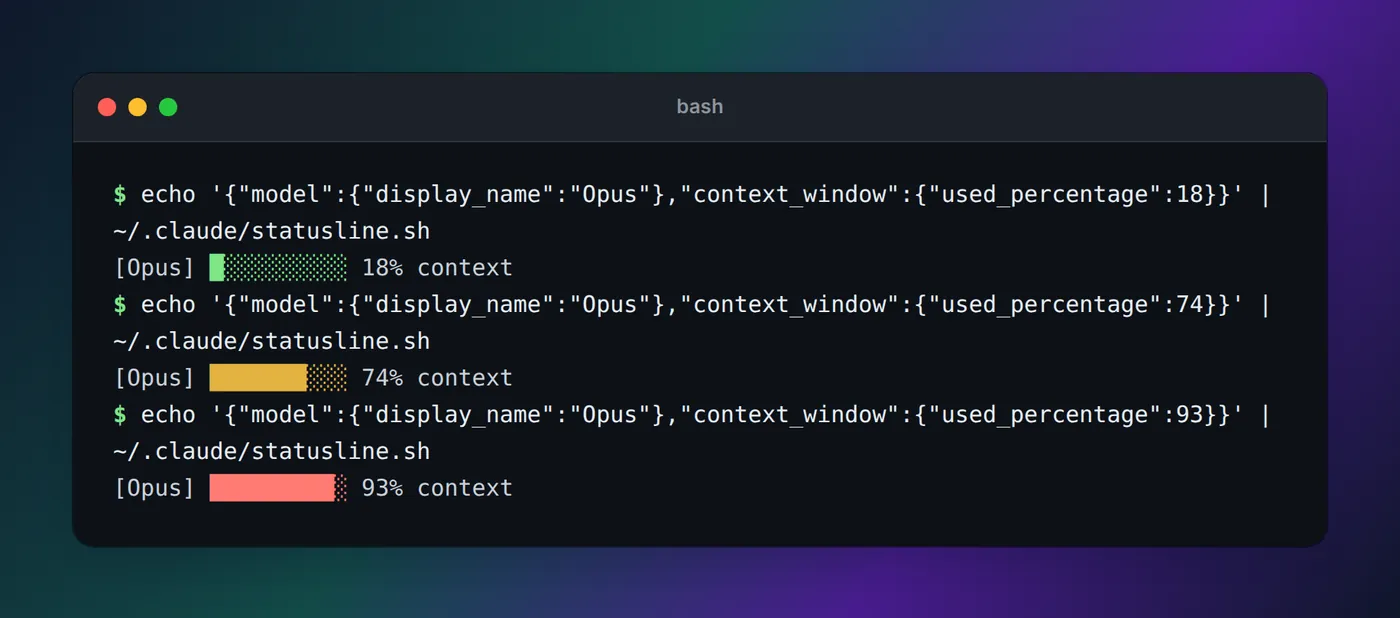
Output: [Opus] 18% context.
2. Context bar with warning colors
A ten-block bar that turns yellow at 70% and red at 90%, so you know when to /compact or /clear:
#!/bin/bash
# Model name plus a 10-block context bar that turns yellow at 70% and red at 90%
input=$(cat)
MODEL=$(echo "$input" | jq -r '.model.display_name')
PCT=$(echo "$input" | jq -r '.context_window.used_percentage // 0 | floor')

if [ "$PCT" -ge 90 ]; then COLOR='\033[31m'
elif [ "$PCT" -ge 70 ]; then COLOR='\033[33m'
else COLOR='\033[32m'; fi
RESET='\033[0m'

FILLED=$((PCT / 10)); EMPTY=$((10 - FILLED))
BAR=""
[ "$FILLED" -gt 0 ] && printf -v FILL "%${FILLED}s" && BAR="${FILL// /█}"
[ "$EMPTY" -gt 0 ] && printf -v PAD "%${EMPTY}s" && BAR="${BAR}${PAD// /░}"

printf '%b\n' "[$MODEL] ${COLOR}${BAR}${RESET} ${PCT}% context"
Output: [Opus] █░░░░░░░░░ 18% context, in green.
3. Session cost, time and lines changed
One jq call, read into variables with @tsv:
#!/bin/bash
# Session cost (API list price), wall-clock time and lines changed
input=$(cat)
IFS=$'\t' read -r MODEL COST MS ADDED REMOVED < <(echo "$input" | jq -r '[
  .model.display_name,
  (.cost.total_cost_usd // 0),
  (.cost.total_duration_ms // 0),
  (.cost.total_lines_added // 0),
  (.cost.total_lines_removed // 0)
] | @tsv')

MINS=$((MS / 60000))
printf '[%s] $%.2f · %dm · +%s -%s\n' "$MODEL" "$COST" "$MINS" "$ADDED" "$REMOVED"
Output: [Opus] $3.42 · 45m · +156 -23. On an API key the dollar figure approximates your bill. On Pro and Max it's what the session would have cost at API prices, not a charge; our guide to API value versus what you pay explains the difference.
4. Plan limits with the reset time
For Pro and Max: how much of the 5-hour and weekly limits you've used, and when the 5-hour window resets. strflocaltime needs jq 1.6 or later:
#!/bin/bash
# Pro and Max only: 5-hour and weekly limit usage, with the 5-hour reset time
input=$(cat)
MODEL=$(echo "$input" | jq -r '.model.display_name')
LIMITS=$(echo "$input" | jq -r '
  [ (.rate_limits.five_hour // empty
      | "5h \(.used_percentage | floor)% (resets \(.resets_at | strflocaltime("%H:%M")))"),
    (.rate_limits.seven_day // empty
      | "7d \(.used_percentage | floor)%") ]
  | join(" · ")')

if [ -n "$LIMITS" ]; then
  echo "[$MODEL] $LIMITS"
else
  echo "[$MODEL]"
fi
Output: [Opus] 5h 73% (resets 23:32) · 7d 41%. On an API key it prints just [Opus]. Our guide to the Claude Code 5-hour limit explains how the two windows work.
5. Git branch and changed files, cached
Git commands can be slow in big repos and the script runs often, so this caches the result for five seconds. The cache file is keyed by session_id, which is stable within a session and unique across sessions:
#!/bin/bash
# Folder, git branch and changed-file count, cached for 5 seconds per session
input=$(cat)
MODEL=$(echo "$input" | jq -r '.model.display_name')
DIR=$(echo "$input" | jq -r '.workspace.current_dir')
SESSION=$(echo "$input" | jq -r '.session_id')

CACHE="/tmp/statusline-git-$SESSION"
AGE=999
if [ -f "$CACHE" ]; then
  MTIME=$(stat -c %Y "$CACHE" 2>/dev/null || stat -f %m "$CACHE" 2>/dev/null || echo 0)
  AGE=$(( $(date +%s) - MTIME ))
fi

if [ "$AGE" -gt 5 ]; then
  if git -C "$DIR" rev-parse --git-dir > /dev/null 2>&1; then
    BRANCH=$(git -C "$DIR" branch --show-current 2>/dev/null)
    CHANGED=$(git -C "$DIR" status --porcelain 2>/dev/null | wc -l | tr -d ' ')
    echo "$BRANCH|$CHANGED" > "$CACHE"
  else
    echo "|" > "$CACHE"
  fi
fi

IFS='|' read -r BRANCH CHANGED < "$CACHE"
if [ -n "$BRANCH" ]; then
  echo "[$MODEL] ${DIR##*/} on $BRANCH ($CHANGED changed)"
else
  echo "[$MODEL] ${DIR##*/}"
fi
Output: [Opus] shop-api on main (3 changed). The stat -c form (Linux) runs before stat -f (macOS) on purpose: the docs point out that on Linux the macOS form prints a filesystem report before failing, which would break the arithmetic.
6. Prompt cache: warm or cold
On a subscription the main conversation's cache lasts an hour; on an API key, five minutes. A message after it goes cold reprocesses the whole conversation. This shows how long you have (requires Claude Code v2.1.251 or later):
#!/bin/bash
# Prompt cache: warm or cold, minutes until it expires, and the session hit ratio
input=$(cat)
MODEL=$(echo "$input" | jq -r '.model.display_name')
CACHE=$(echo "$input" | jq -r '
  .prompt_cache // empty
  | if .warm and .expires_at then
      "cache warm \(((.expires_at - now) / 60) | floor)m left"
    else "cache cold" end
    + (if .hit_ratio then " · \((.hit_ratio * 100) | floor)% hits" else "" end)')

echo "[$MODEL]${CACHE:+ $CACHE}"
Output: [Opus] cache warm 39m left · 91% hits. Claude Code re-runs the status line when the cache reaches its expiry, so it flips to "cold" on its own.
7. A two-line dashboard
Where you are on the first line; context, cost and plan limits on the second, each colored by how close it is to full:
#!/bin/bash
# Two lines: where you are, then context, cost and plan limits
input=$(cat)
IFS=$'\t' read -r MODEL DIR PCT COST FIVE WEEK < <(echo "$input" | jq -r '[
  .model.display_name,
  .workspace.current_dir,
  (.context_window.used_percentage // 0 | floor),
  (.cost.total_cost_usd // 0),
  (.rate_limits.five_hour.used_percentage // -1 | floor),
  (.rate_limits.seven_day.used_percentage // -1 | floor)
] | @tsv')

CYAN='\033[36m'; GREEN='\033[32m'; YELLOW='\033[33m'; RED='\033[31m'; RESET='\033[0m'
color() { if [ "$1" -ge 90 ]; then printf '%s' "$RED"; elif [ "$1" -ge 70 ]; then printf '%s' "$YELLOW"; else printf '%s' "$GREEN"; fi; }

BRANCH=$(git -C "$DIR" branch --show-current 2>/dev/null)
LINE1="${CYAN}[$MODEL]${RESET} ${DIR##*/}${BRANCH:+ on $BRANCH}"

LINE2="$(color "$PCT")ctx ${PCT}%${RESET} · $(printf '$%.2f' "$COST")"
[ "$FIVE" -ge 0 ] && LINE2="$LINE2 · $(color "$FIVE")5h ${FIVE}%${RESET}"
[ "$WEEK" -ge 0 ] && LINE2="$LINE2 · $(color "$WEEK")7d ${WEEK}%${RESET}"

printf '%b\n' "$LINE1" "$LINE2"
Output:
[Opus] shop-api on main
ctx 18% · $3.42 · 5h 73% · 7d 41%
Each printf line becomes its own row. Multi-line output with colors is more prone to rendering glitches than a single plain line, so drop the colors if you see garbling.
8. Python, with no jq
If you'd rather not install jq, Python's standard library covers it. Save as ~/.claude/statusline.py, chmod +x it, and point command at that path:
#!/usr/bin/env python3
# No jq needed: model, context, cost and (on Pro and Max) the 5-hour limit
import json
import sys
import time

data = json.load(sys.stdin)
model = data.get("model", {}).get("display_name", "?")
ctx = int(data.get("context_window", {}).get("used_percentage") or 0)
cost = data.get("cost", {}).get("total_cost_usd") or 0

parts = [f"[{model}]", f"ctx {ctx}%", f"${cost:.2f}"]

five = (data.get("rate_limits") or {}).get("five_hour")
if five:
    mins_left = max(0, int((five["resets_at"] - time.time()) // 60))
    parts.append(f"5h {five['used_percentage']:.0f}% ({mins_left // 60}h{mins_left % 60:02d}m left)")

print(" · ".join(parts))
Output: [Opus] · ctx 18% · $3.42 · 5h 74% (1h29m left).
Test a script before you use it
Pipe sample JSON in, as the docs suggest:
echo '{"model":{"display_name":"Opus"},"workspace":{"current_dir":"/home/user/project"},"context_window":{"used_percentage":25},"cost":{"total_cost_usd":1.5},"session_id":"test-session-abc"}' | ~/.claude/statusline.shTest once with rate_limits in the JSON and once without, so you know the script handles both a subscription and an API key. If it prints nothing or errors, Claude Code shows a blank status line.
On Windows
Claude Code runs the status line through Git Bash when it's installed, or PowerShell otherwise. Git Bash eats unquoted backslashes, so write paths with forward slashes. To run a PowerShell script:
{
  "statusLine": {
    "type": "command",
    "command": "powershell -NoProfile -File C:/Users/username/.claude/statusline.ps1"
  }
}$input_json = $input | Out-String | ConvertFrom-Json
$cwd = $input_json.cwd
$model = $input_json.model.display_name
$used = $input_json.context_window.used_percentage
$dirname = Split-Path $cwd -Leaf
if ($used) {
Write-Host "$dirname [$model] ctx: $used%"
} else {
Write-Host "$dirname [$model]"
}That PowerShell script is the one from the docs; it hasn't been run on Windows here.
Status line not showing?
Work down this list from the troubleshooting section:
| Symptom | Likely cause | Fix |
|---|---|---|
| Nothing appears | Script not executable | chmod +x ~/.claude/statusline.sh |
| Nothing appears | Output goes to stderr, or the script exits non-zero | Print to stdout and exit 0; run it by hand with sample JSON |
| Blank in a new folder | Workspace trust not accepted | Restart and accept the trust dialog; claude --debug logs "workspace trust not accepted" |
| Disappeared everywhere | disableAllHooks: true, or your organization set allowManagedHooksOnly | Remove the setting, or ask your admin |
Shows -- or empty values | Fields are null before the first response | Use fallbacks such as // 0 |
| Fails on Windows | Backslashes in the path | Use forward slashes |
| Laggy | Slow commands such as git status | Cache them, as in example 5 |
| Cut off | Notifications share the row on narrow terminals | Keep output short |
Run claude --debug to log the script's stderr on every run and its exit code on the first. If you want ready-made themes instead of your own script, the docs link community projects such as ccstatusline and starship-claude.
When one terminal isn't enough
A status line describes the session it's in. If you run several Claude Code sessions in different terminals, each shows only its own numbers, and none of them tells you when another one is waiting for permission. That's the gap a notch app fills: Eddie shows every session as working, needs you or done, in the MacBook notch or at the edge of your Windows desktop, and on a Mac adds tokens and API-equivalent cost per session, project and day. It doesn't replace the status line's plan-limit percentages, so the two work well together. The guide to watching agents from the MacBook notch shows the setup, and our token usage guide covers the other ways to track usage.
FAQ
How do I set up the Claude Code status line?
Run /statusline followed by what you want to see, such as /statusline show model and context percentage, and Claude Code writes the script and settings for you. To do it by hand, add a statusLine object with "type": "command" and a command to ~/.claude/settings.json.
Why is my Claude Code status line not showing?
The usual causes are a script that isn't executable, output going to stderr instead of stdout, a script that exits with an error, or a folder you haven't accepted in the workspace trust dialog. disableAllHooks and an organization's allowManagedHooksOnly also turn custom status lines off. Run claude --debug to see the script's errors.
Can the Claude Code status line show usage limits?
Yes, on Pro and Max. The JSON includes rate_limits.five_hour.used_percentage, rate_limits.seven_day.used_percentage and a resets_at time for each, after the session's first response. On an API key those fields are absent; show cost.total_cost_usd instead.
Does the status line use tokens?
No. The script runs locally on your machine and the docs state it doesn't consume API tokens.
Does the Claude Code status line work on Windows?
Yes. Claude Code runs the command through Git Bash when it's installed, or PowerShell otherwise. Use forward slashes in the script path, or call a PowerShell script with powershell -NoProfile -File C:/Users/you/.claude/statusline.ps1.
Is there a Claude Code statusline plugin?
Community projects such as ccstatusline and starship-claude, linked from the official docs, provide ready-made configurations with themes. A plain script like the examples here needs nothing installed except, for the Bash versions, jq.