
Hooks and permissions
Claude Code Hooks vs Skills: What's the Difference?
Claude Code hooks vs skills: hooks run your code on every matching event, skills are instructions Claude applies when relevant. When to use each, with examples.
On this page
The difference between Claude Code hooks vs skills is who decides. A hook is your own command that Claude Code runs automatically every time a matching event happens, such as before a tool call or when Claude finishes, so it behaves the same way every time. A skill is a SKILL.md file of instructions that Claude loads when you type /name or when your request matches its description, and Claude decides how to apply it. Use hooks for things that must always happen; use skills for workflows that need judgment.
The details below come from the official Extend Claude Code overview, the skills docs and the hooks reference, checked on October 3, 2026.
Hooks vs skills at a glance
| Hook | Skill | |
|---|---|---|
| What it is | A shell command, HTTP request, MCP tool call, prompt or subagent | Markdown instructions, plus optional supporting files |
| Who triggers it | Claude Code, on a lifecycle event like PreToolUse or Stop | You with /name, or Claude when the description fits |
| Does it always run? | Yes, on every matching event | Only when invoked, and Claude interprets it |
| Can it block an action? | Yes, with exit code 2 or a JSON decision | No, it can only ask Claude not to |
| Context cost | None unless it returns output | Description every request, full text when used |
| Where it lives | The hooks object in a settings file, a plugin, or skill frontmatter | .claude/skills/<name>/SKILL.md or ~/.claude/skills/<name>/SKILL.md |
| Best for | Guard rails, formatting, logging, notifications | Checklists, playbooks, reference material, multi-step tasks |
The official docs put it in one line: Claude Code runs a hook at a lifecycle event, and it loads a skill into context for Claude to apply.
What a Claude Code hook is
A hook is configured in three levels: the event, a matcher that filters it, and the handler that runs. This one runs Prettier on every file Claude writes or edits:
{
  "hooks": {
    "PostToolUse": [
      {
        "matcher": "Edit|Write",
        "hooks": [
          {
            "type": "command",
            "command": "jq -r '.tool_input.file_path' | xargs npx prettier --write"
          }
        ]
      }
    ]
  }
}
Claude doesn't choose whether to run it, and can't forget it. Claude Code sends the event as JSON on stdin, and the hook answers with an exit code: 0 to carry on, 2 to block on events that can be blocked, with stderr passed to Claude as the reason. There are more than 30 events, from SessionStart to PermissionRequest to Stop; Claude Code hooks explained lists them all.
That reliability is why tools that track sessions are built on hooks. Eddie, our notch app for Mac and Windows, registers a few hooks to learn the moment a session finishes or asks for permission, and shows it in the MacBook notch or at the edge of your Windows desktop. A skill couldn't do that job, because nothing guarantees it runs.
What a Claude Code skill is
A skill is a folder with a SKILL.md file. The frontmatter tells Claude when to use it, and the body is what Claude reads when it does:
---
description: Prepare a release. Use when the user asks to cut, tag or ship a release.
disable-model-invocation: true
allowed-tools: Bash(git log *)
---

## Recent commits

!`git log --oneline -30`

## Steps

1. Find the commits since the last release tag and group them into Features, Fixes and Chores for the changelog.
2. Pick the next version number following semver, and explain why.
3. Update CHANGELOG.md and the version in package.json.
4. Run the test suite. Stop and report if anything fails.
5. Show the diff and wait for approval before committing or tagging.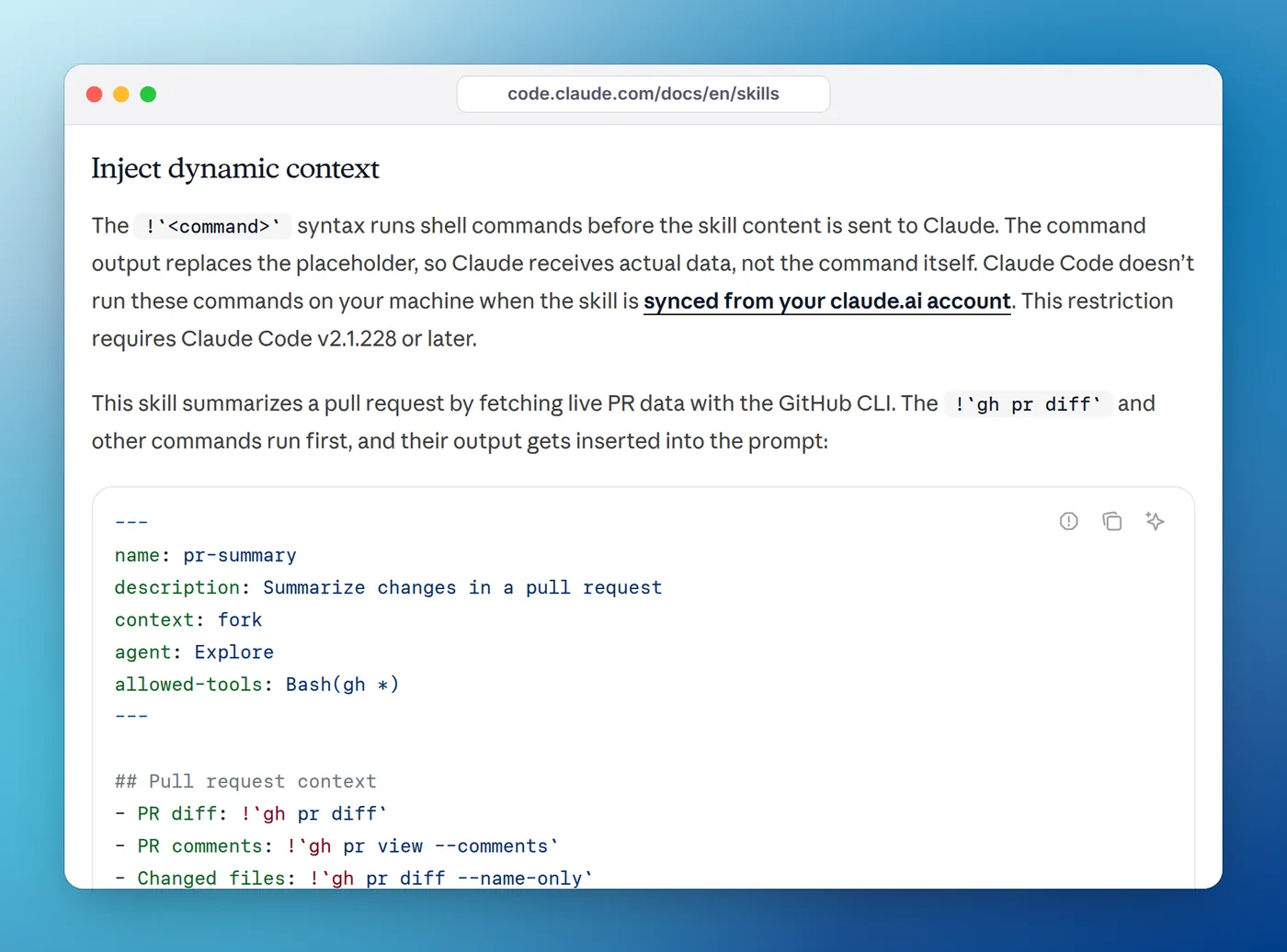
The folder name becomes the command, so this is /release. The !`git log ...` line is dynamic context injection: Claude Code runs the command when the skill is invoked and puts the output in place of the line, so Claude starts with the real commit list. Injected commands never prompt; outside auto mode, one your permission rules don't allow aborts the skill, which is why allowed-tools pre-approves git log here. Steps like "pick the next version" and "group the commits" need judgment, which is exactly what a skill is for.
Skills live in a few places:
| Location | Path | Loads in |
|---|---|---|
| Personal | ~/.claude/skills/<name>/SKILL.md | All your projects on this machine |
| Project | .claude/skills/<name>/SKILL.md | This repository; commit it to share |
| Plugin | <plugin>/skills/<name>/SKILL.md | Wherever the plugin is enabled, as /plugin-name:skill-name |
Two frontmatter fields decide who can start a skill. By default both you and Claude can. disable-model-invocation: true makes it yours only, which the docs recommend for anything with side effects like /deploy or /commit, because you don't want Claude deciding to deploy. user-invocable: false hides it from the / menu so only Claude loads it, which suits background knowledge such as how a legacy system works.
Custom slash commands are now part of this system. A file in .claude/commands/ still creates a command, but skills add a folder for supporting files and automatic loading. Skills also follow the Agent Skills open standard, so the same SKILL.md format works in other tools that support it.
When to use a hook
Reach for a hook when the answer to "should this happen?" is always yes:
- Guard rails. Block edits to
.env, block force pushes, or force a confirmation before a push to main. - Formatting and linting. Run the formatter after every edit, and feed linter errors back to Claude with exit code 2.
- Context that changes. Add the current branch to every prompt, or re-add key notes after compaction with a
SessionStarthook on thecompactsource. - Logging and audit. Append every shell command or prompt to a file.
- Notifications. Tell you when Claude finishes or needs permission.
12 useful Claude Code hooks has copy-paste versions of most of these.
When to use a skill
Reach for a skill when you'd otherwise paste the same instructions into chat again:
- Repeatable workflows that need reasoning: a release, a code review checklist, a migration recipe.
- Reference material Claude needs sometimes but not always: your API style guide, a database schema, how an internal service works.
- Playbooks: how your team debugs a flaky test or triages a production error.
The docs' rule of thumb for spotting one: you keep typing the same prompt to start a task, or you paste the same procedure into chat for the third time. If you keep correcting the same convention instead, that's a line for CLAUDE.md, which loads every session.
The same job, done both ways
Take "don't finish while the tests are failing". As a skill or a CLAUDE.md line, it's an instruction: Claude will usually run the tests, but in a long session it can skip them, and nothing stops it. As a Stop hook, Claude Code runs your test command every time Claude tries to finish and sends it back to work on failure:
#!/bin/bash
# Keeps Claude working while the test suite fails.
input=$(cat)
if [ "$(printf '%s' "$input" | jq -r '.stop_hook_active')" = "true" ]; then
  exit 0
fi
if ! npm test --silent >/dev/null 2>&1; then
  echo "The test suite is failing. Fix the failures before you finish." >&2
  exit 2
fi
exit 0{
"hooks": {
"Stop": [
{
"hooks": [
{ "type": "command", "command": "\"$CLAUDE_PROJECT_DIR\"/.claude/hooks/tests-before-stop.sh" }
]
}
]
}
}The stop_hook_active check stops a loop when Claude is already continuing because of the hook. The overview page says it plainly: an instruction like "never edit .env" in CLAUDE.md or a skill is a request, while a PreToolUse hook that blocks the edit is enforcement.
The reverse is also true. A hook can't decide which version number a release deserves or how to word a changelog. Forcing judgment into a script gives you a brittle script.
Using hooks and skills together
The two aren't rivals, and several features connect them.
Hooks inside a skill. A skill's frontmatter can declare hooks in the same format as settings. Claude Code registers them when the skill is invoked and keeps them running for the rest of the session. Add once: true to a hook there and it's removed after its first successful run. This example from the hooks reference checks every Bash command once the skill is active:
---
name: secure-operations
description: Perform operations with security checks
hooks:
  PreToolUse:
    - matcher: "Bash"
      hooks:
        - type: command
          command: "./scripts/security-check.sh"
---
Hook output that points to a skill. A PostToolUse hook that runs your linter feeds the results back as text Claude reads; a /fix-lint skill tells Claude how your team wants them fixed. The hook guarantees the check, and the skill supplies the know-how.
Pre-approved tools. A skill's allowed-tools field lets Claude use the listed tools without a permission prompt during the turn that invokes it. It isn't a hook: the grant clears when you send your next message, and the docs warn to review allowed-tools in skills checked into a repository, because a skill can grant itself broad access.
Plugins bundle skills, hooks, subagents and MCP servers into one installable package, so a team can ship a skill and the hooks that enforce it together.
Where CLAUDE.md, subagents and MCP fit
Hooks and skills are two of several ways to extend Claude Code. The official overview sorts them like this:
| Feature | Loads or runs | Use it for |
|---|---|---|
CLAUDE.md | Every session, full text | Conventions and "always do X" rules Claude should know |
| Skill | Description each session, body on demand | Workflows and reference material |
| Hook | On its event, outside the conversation | Anything that must happen every time |
| Subagent | In its own context, returns a summary | Side tasks that would flood your conversation |
| MCP server | Tool names at start, schemas on use | Connecting external systems like a database or Slack |
Context cost is part of the choice. Skill descriptions are in every request, so vague or overlapping ones can make Claude load the wrong skill. Hooks run outside the conversation and cost nothing unless they return output. CLAUDE.md loads in full every time, which is why the docs suggest keeping it under 200 lines and moving reference material into skills.
Checking what you have
Two commands show what's configured. /hooks opens a read-only list of every hook with the file or plugin it came from. /skills lists every available skill, with a token-count sort so you can spot expensive ones. If a hook isn't firing, how to debug Claude Code hooks goes through the usual causes. If a skill never triggers, the skills docs suggest rewriting its description around the words you actually use when you ask for that task.
FAQ
What are hooks in Claude Code?
Hooks are shell commands, HTTP calls, MCP tool calls, prompts or subagents that Claude Code runs automatically at lifecycle events, such as before a tool call, after a file edit or when Claude finishes. They live in the hooks object of a settings file and can block, allow or add context through exit codes and JSON output.
How do I use skills in Claude Code?
Create a folder such as ~/.claude/skills/deploy/ with a SKILL.md file inside: YAML frontmatter with a description, then the instructions. Type /deploy to run it, or let Claude load it when your request matches the description. /skills lists every skill available in the session.
Are custom slash commands the same as skills?
They've been merged. A file at .claude/commands/deploy.md and a skill at .claude/skills/deploy/SKILL.md both create /deploy and work the same way. Old command files keep working, but skills add supporting files, invocation control and automatic loading, so the docs recommend skills for new work.
Can a skill contain hooks?
Yes. A hooks: field in the skill's frontmatter registers hooks when the skill is invoked, and they keep running for the rest of the session. Set once: true on a hook there to have Claude Code remove it after its first successful run.
Do skills use up context?
A little. By default each skill's name and description load at session start so Claude knows it exists, and the full SKILL.md loads only when the skill is used. Skills with disable-model-invocation: true cost nothing until you invoke them. Hooks cost no context unless they return output.
Should a rule like "never edit .env" go in CLAUDE.md, a skill or a hook?
A hook, or a deny rule in your permission settings. Text in CLAUDE.md or a skill is an instruction Claude usually follows, not a guarantee. A PreToolUse hook that exits with code 2 on .env edits is enforced by Claude Code every time.