
Hooks and permissions
12 Useful Claude Code Hooks (Copy-Paste Examples)
12 Claude Code hooks examples to copy: block risky commands, guard pushes to main, lint after edits, catch secrets in prompts and get alerts on API errors.
On this page
Claude Code hooks examples are easiest to learn from when they solve a real problem, so this page collects 12 that do: blocking risky shell commands, asking before a push to main, feeding lint errors back to Claude, catching secrets in prompts, restoring context after compaction and alerting you when a turn fails. Each one is a complete settings block you can paste into ~/.claude/settings.json or your project's .claude/settings.json, plus a script where one is needed.
Every example was checked against the official hooks reference and hooks guide on October 3, 2026. The shell scripts were run on Linux with sample event JSON on stdin; the macOS-only lines (osascript) were checked against the docs, not run. If you're new to hooks, start with Claude Code hooks explained, which covers the format and every event. It has six more examples that this page doesn't repeat.
The 12 hooks at a glance
| # | Hook | Event | What it does |
|---|---|---|---|
| 1 | Block dangerous commands | PreToolUse | Stops force pushes, hard resets and curl | sh |
| 2 | Ask before pushing to main | PreToolUse + if | Forces a confirmation, even in auto mode |
| 3 | Block prompts with secrets | UserPromptSubmit | Rejects prompts that contain API keys |
| 4 | Feed lint errors back | PostToolUse | Runs ESLint on each edited file and tells Claude what broke |
| 5 | Run tests in the background | PostToolUse, async | Tests run while Claude keeps working |
| 6 | Restore context after compaction | SessionStart | Re-adds notes the summary dropped |
| 7 | Tell Claude the current branch | UserPromptSubmit | Adds the branch to every prompt |
| 8 | Skip the plan-approval prompt | PermissionRequest | Approves ExitPlanMode for you |
| 9 | Desktop alert through your terminal | Notification | Uses terminalSequence, no OS tools needed |
| 10 | Alert on rate limits | StopFailure | Logs API failures and pops a notification |
| 11 | Audit every shell command | PostToolUse | Appends each Bash command to a log |
| 12 | Let a model check before stopping | Stop, prompt | Sends Claude back if it skipped the tests |
The scripts use jq to read the event JSON. Install it with brew install jq on macOS or your package manager on Linux. Save each script where its title says, run chmod +x on it, then merge the settings block into your file. Several events can sit side by side in one hooks object.
Guard rails
1. Block dangerous shell commands
#!/bin/bash
# Blocks shell commands that are almost never what you meant.
cmd=$(jq -r '.tool_input.command // empty')
pattern='git push.* (--force|-f)( |$)|git reset --hard|git clean -[a-z]*f|(curl|wget) [^|]*\| *(ba|z)?sh|drop (table|database)'
if printf '%s' "$cmd" | grep -Eiq "$pattern"; then
  echo "Blocked by a PreToolUse hook: \"$cmd\" matches a dangerous pattern. Explain what you wanted to do and let the user run it." >&2
  exit 2
fi
exit 0{
"hooks": {
"PreToolUse": [
{
"matcher": "Bash",
"hooks": [
{ "type": "command", "command": "\"$CLAUDE_PROJECT_DIR\"/.claude/hooks/block-dangerous.sh" }
]
}
]
}
}Exit code 2 cancels the call and hands the stderr text to Claude, so it can explain itself instead of retrying. git push --force-with-lease still goes through, because the pattern only matches a bare --force or -f. Exit 1 would not block: Claude Code treats it as a non-blocking error and runs the command anyway. Claude Code already protects critical paths such as / and your home directory from rm, in every permission mode, so this hook covers the mistakes it doesn't.
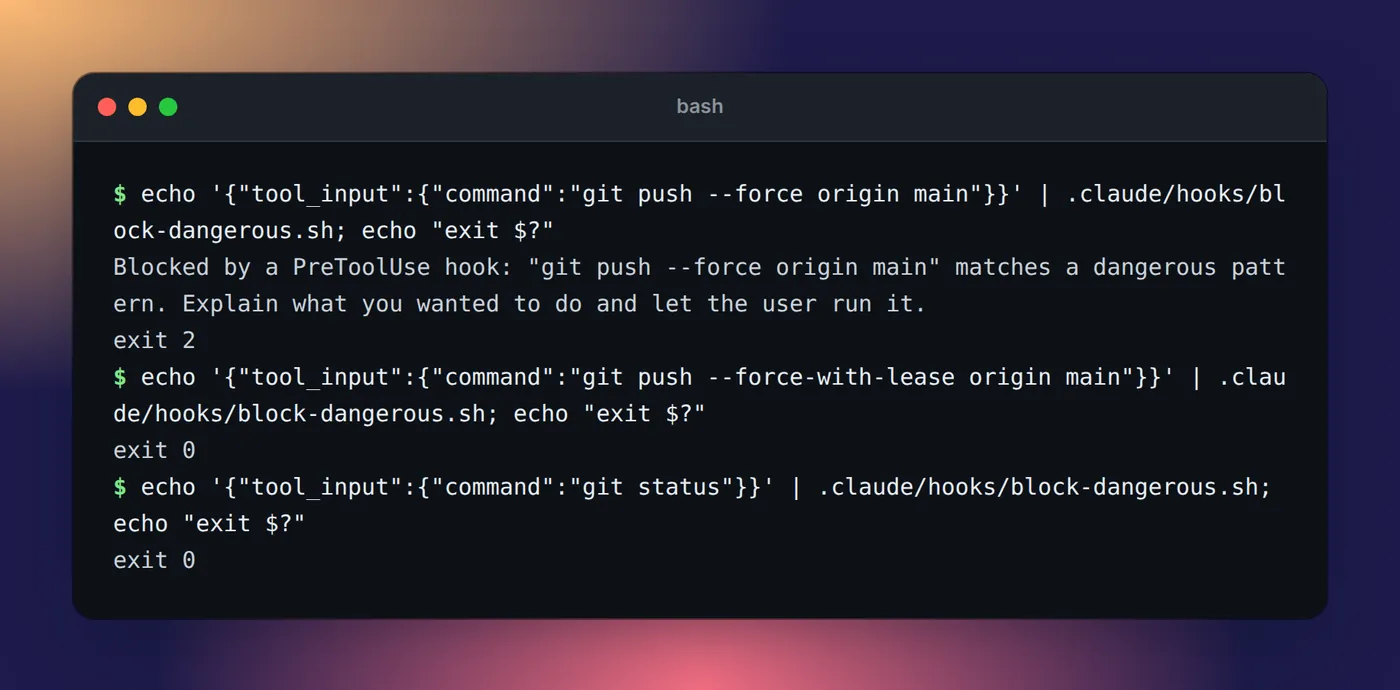
block-dangerous.sh fed three sample commands on stdin. Only the bare --force push is blocked.2. Ask before any push that could reach main
#!/bin/bash
# Asks you to confirm any push that could reach main or master.
cmd=$(jq -r '.tool_input.command // empty')
branch=$(git branch --show-current 2>/dev/null)
if printf '%s' "$cmd" | grep -Eq '(^|[^[:alnum:]_/-])(main|master)([^[:alnum:]_/-]|$)' || [ "$branch" = main ] || [ "$branch" = master ]; then
  jq -nc --arg r "This push can reach main or master. Check it before it goes out." \
    '{hookSpecificOutput: {hookEventName: "PreToolUse", permissionDecision: "ask", permissionDecisionReason: $r}}'
fi
exit 0{
"hooks": {
"PreToolUse": [
{
"matcher": "Bash",
"hooks": [
{
"type": "command",
"if": "Bash(git push *)",
"command": "\"$CLAUDE_PROJECT_DIR\"/.claude/hooks/push-guard.sh"
}
]
}
]
}
}The if field runs the script only for git push commands, so it costs nothing on every other call. Returning permissionDecision: "ask" shows you a normal permission prompt with the reason, and the docs say a hook's ask still forces that prompt in auto mode, where most pushes would otherwise run on their own. If you want to confirm every push, not just ones near main, an ask rule of Bash(git push *) in your permission settings does it with no script.
3. Block prompts that contain secrets
This one is on UserPromptSubmit, so it runs before Claude sees your prompt:
#!/bin/bash
# Stops a prompt that looks like it contains an API key or a private key.
prompt=$(jq -r '.prompt // empty')
if printf '%s' "$prompt" | grep -Eq 'sk-ant-[A-Za-z0-9_-]{20,}|AKIA[0-9A-Z]{16}|ghp_[A-Za-z0-9]{36}|BEGIN [A-Z ]*PRIVATE KEY'; then
  jq -nc '{decision: "block", reason: "That prompt looks like it contains a secret. Remove it and send it again.", hookSpecificOutput: {hookEventName: "UserPromptSubmit", suppressOriginalPrompt: true}}'
fi
exit 0{
"hooks": {
"UserPromptSubmit": [
{
"hooks": [
{ "type": "command", "command": "\"$HOME\"/.claude/hooks/secret-guard.sh" }
]
}
]
}
}The patterns catch a few common key shapes, not every secret, so treat it as a seatbelt. suppressOriginalPrompt keeps the key out of the block message, but the docs are clear that a blocked prompt can still land in local files such as your prompt history, so rotate any key you paste by accident.
Code quality
4. Feed lint errors back to Claude
#!/bin/bash
# Runs ESLint on the file Claude just edited and hands any problems back to Claude.
file=$(jq -r '.tool_input.file_path // empty')
case "$file" in
  *.js|*.jsx|*.ts|*.tsx) ;;
  *) exit 0 ;;
esac
if ! out=$(npx eslint "$file" 2>&1); then
  printf 'ESLint found problems in %s:\n%s\n' "$file" "$out" >&2
  exit 2
fi
exit 0{
"hooks": {
"PostToolUse": [
{
"matcher": "Edit|Write",
"hooks": [
{ "type": "command", "command": "\"$CLAUDE_PROJECT_DIR\"/.claude/hooks/lint-feedback.sh" }
]
}
]
}
}A PostToolUse hook can't undo the edit, but exit 2 puts your stderr in front of Claude right after the tool result, so it fixes the problem in the same turn. Install ESLint as a project dependency first. Swap the command for ruff check, cargo clippy or your own linter; the shape stays the same.
5. Run tests in the background after edits
#!/bin/bash
# Runs the test suite after a source edit and reports the result to Claude.
file=$(jq -r '.tool_input.file_path // empty')
case "$file" in
  *.ts|*.js) ;;
  *) exit 0 ;;
esac
if result=$(npm test 2>&1); then
  msg="Tests passed after editing $file"
else
  msg="Tests failed after editing $file: $result"
fi
jq -nc --arg msg "$msg" '{hookSpecificOutput: {hookEventName: "PostToolUse", additionalContext: $msg}}'{
"hooks": {
"PostToolUse": [
{
"matcher": "Write|Edit",
"hooks": [
{
"type": "command",
"command": "\"$CLAUDE_PROJECT_DIR\"/.claude/hooks/run-tests-async.sh",
"async": true
}
]
}
]
}
}With "async": true Claude doesn't wait. When the script finishes, its additionalContext reaches Claude on the next turn, as the async hooks section of the reference describes. Async hooks can't block, and in a -p run Claude Code kills any that are still running when the run ends.
Context for Claude
6. Restore key context after compaction
{
  "hooks": {
    "SessionStart": [
      {
        "matcher": "compact",
        "hooks": [
          {
            "type": "command",
            "command": "cat \"$CLAUDE_PROJECT_DIR\"/.claude/after-compact.md 2>/dev/null; git log --oneline -5 2>/dev/null"
          }
        ]
      }
    ]
  }
}
When the context fills up, Claude Code summarizes the conversation and details get lost. SessionStart fires again after compaction with the compact source, and plain text on stdout becomes context, so Claude gets your notes file and the last five commits back. Keep the notes short and factual. For rules that apply to every session, CLAUDE.md is the better home.
7. Tell Claude the current branch with every prompt
{
  "hooks": {
    "UserPromptSubmit": [
      {
        "hooks": [
          {
            "type": "command",
            "command": "b=$(git branch --show-current 2>/dev/null); [ -n \"$b\" ] && echo \"The current git branch is $b.\"; exit 0"
          }
        ]
      }
    ]
  }
}
On UserPromptSubmit, plain stdout is added next to your prompt. The docs recommend phrasing it as a fact, like this, rather than as an instruction, so Claude reads it as information. Keep it fast: these hooks run before every prompt with a 30-second default timeout.
Permissions and alerts
8. Skip the plan-approval prompt
{
  "hooks": {
    "PermissionRequest": [
      {
        "matcher": "ExitPlanMode",
        "hooks": [
          {
            "type": "command",
            "command": "echo '{\"hookSpecificOutput\": {\"hookEventName\": \"PermissionRequest\", \"decision\": {\"behavior\": \"allow\"}}}'"
          }
        ]
      }
    ]
  }
}
This is straight from the hooks guide. When Claude finishes a plan, the hook approves it and Claude Code returns to the permission mode you were in before plan mode. Keep the matcher exactly ExitPlanMode: an empty matcher here would approve every permission prompt. Permission modes explained covers plan mode itself.
9. Desktop alerts through your terminal
#!/bin/bash
# Notification hook: a desktop notification through your terminal, on any OS.
input=$(cat)
body=$(jq -r '.message // "Claude Code needs your attention"' <<<"$input")
seq=$(printf '\033]777;notify;%s;%s\007' "Claude Code" "$body")
jq -nc --arg seq "$seq" '{terminalSequence: $seq}'{
"hooks": {
"Notification": [
{
"matcher": "permission_prompt|idle_prompt",
"hooks": [
{ "type": "command", "command": "\"$HOME\"/.claude/hooks/notify-terminal.sh" }
]
}
]
}
}Hooks have no /dev/tty, so instead of printing the escape code yourself you return it in terminalSequence and Claude Code writes it. OSC 777 works in Ghostty, Warp and urxvt; for iTerm2, WezTerm or Windows Terminal use \033]9;%s\007 with just the message, and Kitty uses OSC 99. For osascript and notify-send versions, see how to get notified when Claude Code finishes.
Banners stop scaling once several sessions run at once. Eddie, our notch app for Mac and Windows, adds its own hooks with one click and keeps every session's state (working, needs you, done) in the MacBook notch or at the edge of your Windows desktop, and taps you when one needs permission. Cursor's agent doesn't report approvals, so those can't show.
10. Get alerted when a turn fails on a rate limit
#!/bin/bash
# Logs API failures and shows a desktop alert, so a stopped session doesn't sit unnoticed.
input=$(cat)
printf '%s' "$input" | jq -c '{time: (now | todate), error, details: .error_details, cwd}' >> "$HOME/.claude/api-errors.jsonl"
msg="Claude Code stopped: $(printf '%s' "$input" | jq -r '.error')"
if command -v osascript >/dev/null 2>&1; then
  osascript -e "display notification \"$msg\" with title \"Claude Code\""
elif command -v notify-send >/dev/null 2>&1; then
  notify-send 'Claude Code' "$msg"
fi
exit 0{
"hooks": {
"StopFailure": [
{
"matcher": "rate_limit|overloaded",
"hooks": [
{ "type": "command", "command": "\"$HOME\"/.claude/hooks/api-error-alert.sh" }
]
}
]
}
}Stop doesn't fire when a turn ends on an API error; StopFailure does, and its matcher filters on the error type. Other values include authentication_failed, billing_error and server_error; drop the matcher to catch them all. Claude Code ignores this event's output and exit code, so it can only log and alert.
Logging and review
11. Keep an audit log of every shell command
{
  "hooks": {
    "PostToolUse": [
      {
        "matcher": "Bash",
        "hooks": [
          {
            "type": "command",
            "command": "jq -c '{time: (now | todate), session: .session_id, cwd, command: .tool_input.command}' >> \"$HOME/.claude/bash-log.jsonl\""
          }
        ]
      }
    ]
  }
}
One JSON line per command, with the session and directory, gives you something to search when you wonder what an agent ran while you were away. Nothing goes to stdout, so Claude's context is untouched.
12. Let a model check the work before Claude stops
{
  "hooks": {
    "Stop": [
      {
        "hooks": [
          {
            "type": "prompt",
            "prompt": "Here is the Stop event: $ARGUMENTS. If last_assistant_message says code was changed but doesn't say the tests were run, respond with ok false and the reason 'Run the test suite before finishing.' Otherwise respond with ok true."
          }
        ]
      }
    ]
  }
}
A prompt hook sends the event to a Claude model, which answers with ok and a reason. On Stop, ok: false feeds the reason back and Claude keeps working. It's judgment rather than a fixed rule, so it costs tokens and can be wrong, and Stop fires at the end of every turn. Use it where a script can't tell, and a command hook where it can.
Hook, permission rule or CLAUDE.md?
Several of these jobs can be done three ways, and the hook isn't always the right one. Claude Code enforces permission rules itself, in order (deny, then ask, then allow), so a fixed pattern is simpler and harder to get wrong as a rule. The docs also call a hook's if filter best-effort and recommend the permission system for a hard allow or deny. CLAUDE.md and skills are instructions Claude reads and follows, not guarantees.
| You want | Use | Why |
|---|---|---|
Confirm every git push | An ask rule: Bash(git push *) | A fixed pattern, no script to maintain |
| Confirm only pushes that can reach main | Hook 2 | Needs logic: the current branch |
| Never let Claude use a tool at all | A deny rule with the bare tool name, like WebFetch | Removes the tool from Claude's context |
| Lint or format after every edit | A PostToolUse hook | Has to happen every time, with no judgment |
| "Use pnpm, not npm" | CLAUDE.md | A convention Claude should know, not enforce |
| A release checklist | A skill | Steps that need Claude to reason |
A good rule of thumb from the docs: if something must hold every time, make it a hook or a rule, not a sentence in a prompt.
Best practices for hooks
- Keep matchers narrow.
Edit|WriteorBashplus anifrule, never an empty matcher onPermissionRequest. - Block with exit 2. Exit 1 is a non-blocking error and the action proceeds.
- Print only JSON when you return JSON. An
echoin your shell profile can break parsing. - Quote variables and use
$CLAUDE_PROJECT_DIRso paths work after Claude changes directory. - Test with sample input before you rely on a hook:
echo '{"tool_input":{"command":"git push -f"}}' | .claude/hooks/block-dangerous.sh; echo $?. - Prefer permission rules for fixed patterns. Hooks are for decisions that need logic.
When a hook doesn't fire, /hooks shows whether it loaded and from which file, and how to debug Claude Code hooks walks through the rest. If you're unsure whether something should be a hook at all, hooks vs skills explains the split.
FAQ
What are good use cases for Claude Code hooks?
Anything that must happen the same way every time without Claude deciding: blocking risky commands, formatting or linting after edits, adding context at session start or after compaction, logging, and notifications. Work that needs judgment, like a release checklist, belongs in a skill instead.
What are Claude Code hooks best practices?
Keep matchers narrow, use exit 2 (not exit 1) when a hook must block, print only JSON on stdout when you return JSON, quote every variable, reference scripts through $CLAUDE_PROJECT_DIR, and test each script with sample JSON on stdin before you rely on it. Use permission rules instead of a hook when the rule is a fixed pattern.
How do I write a Claude Code hook?
Write a script that reads the event JSON from stdin (usually with jq), decides, and answers with an exit code or JSON on stdout. Then register it under the event's name in the hooks object of ~/.claude/settings.json or .claude/settings.json, and check it shows up in /hooks.
Where can I find Claude Code hook examples on GitHub?
Anthropic's anthropics/claude-code repository has a Bash command validator in its examples folder, and the official hooks guide has more. Read any hook from GitHub before you install it: it runs with your full user permissions.
Can a hook run in the background without slowing Claude down?
Yes. Add "async": true to a command hook and Claude keeps working while it runs. An async hook can't block anything, but any additionalContext it prints reaches Claude on the next turn, which suits test runs and slow checks.