
Running agents day to day
Find and Kill the Dev Servers Your AI Agent Left Running
Claude Code zombie processes are usually orphaned dev servers holding a port. Find them with lsof and ps, stop them safely, and keep them from coming back.
On this page
"Zombie processes" from Claude Code are usually not zombies at all: they're dev servers, file watchers and test browsers still running after the session that started them is gone, each holding a port and some memory. Find them with lsof -nP -iTCP -sTCP:LISTEN, which lists every process listening on a port, then stop one with kill <PID> and fall back to kill -9 only if it ignores you. Claude Code stops its own background tasks when it exits, so leftovers mostly come from sessions that ended abruptly and commands built to outlive their caller.
The Claude Code behavior below was checked against the interactive mode and tools reference docs on October 3, 2026, and the process definitions against the Linux wait(2) and _exit(2) man pages. The commands use standard lsof, ps and kill flags that exist on macOS and Linux; we ran them on Linux, not on macOS.
Zombie, orphan or just still running?
The words get used loosely, and the difference decides what you do about it.
| Kind | What it is | Holds a port or memory? | How to get rid of it |
|---|---|---|---|
| Zombie | Exited, but its parent hasn't read its exit status | No, only a process table slot | Fix or stop the parent; you can't kill a zombie |
| Orphan | Still running after its parent exited | Yes | kill <PID> |
| Background task | Still running, with its parent still alive | Yes | Stop it from its parent, such as Claude Code's /tasks |
| Daemon | Detached on purpose to run long term | Yes | Its own stop command, such as docker compose down |
The wait(2) man page defines a zombie as "a child that terminates, but has not been waited for". The kernel keeps its PID and exit status so the parent can collect them, and nothing else. When a parent exits, the _exit(2) man page says its children are inherited by init or the nearest "subreaper", and init reaps any zombies among them. On macOS the equivalent of init is launchd, PID 1.
So a real zombie is rare and harmless unless thousands pile up. The thing that makes npm run dev fail with "port 3000 is already in use" is an orphan: a server that kept running after the terminal, agent or script that started it went away.
Why agents leave processes behind
Agents start a lot of processes. A typical session runs a dev server to check a page, a watch build, a test runner, perhaps a headless Chrome for end-to-end tests. Claude Code has a system for the long-running ones: Claude can start a command with run_in_background: true, or you can press Ctrl+B to send a running command to the background, and it becomes a background task with an ID.
Claude Code is careful with those tasks. According to the interactive mode docs:
- Background tasks are cleaned up automatically when Claude Code exits. On macOS and Linux, stopping a task from
/tasksor at exit also stops processes that detached from the task's shell, such as ones started undersetsidortimeout. - In a local session you work in from a terminal, the desktop app or VS Code, background commands have no time limit. In unattended runs such as
claude -p, they're stopped at a time limit, and-pruns end their background commands shortly after the final result. - If you send the session itself to the background with
/backgroundinstead of exiting, its tasks keep running in the background session. - A command started by a foreground subagent stops when that subagent's run ends.
That leaves a handful of ways a process outlives its session:
- The session didn't exit cleanly. Cleanup runs when Claude Code exits. A crash, a force quit or a killed process doesn't give it that chance, and whatever its tasks started is orphaned.
- The command was built to detach.
docker compose up -d,nohup,pm2 startand similar tools exist to outlive the shell that ran them. That's working as designed; they need their own stop command. - A background session is still running. Sessions you dispatched with
claude --bgor moved there with/bgkeep their dev servers alive by design. They're easy to forget, because no terminal shows them. - Another tool started it. Other agents, editor tasks and your own terminal tabs start servers too, and each one has its own cleanup rules, or none.
Step 1: check inside Claude Code first
If the session that started the process is still alive, stop it there. It's the cleanest option, because Claude Code knows which processes belong to the task.
- In the session, type
/tasksto list its background tasks and stop the ones you don't need. After you stop one, Claude moves on instead of waiting for it. - From your shell,
claude agentsopens agent view with every background session, andclaude stop <id>stops one. - If you run several sessions at once, our guide to running Claude Code sessions in parallel shows how to name them so you can tell which one owns which server.
Step 2: find what's holding your ports
Most of the time you notice leftovers because a port is taken. List every process listening on a TCP port:
lsof -nP -iTCP -sTCP:LISTEN-n and -P skip DNS and port-name lookups so it runs fast and shows numbers, -iTCP limits it to TCP sockets, and -sTCP:LISTEN keeps only listening servers. The output looks like this:
COMMAND   PID  USER   FD   TYPE  DEVICE SIZE/OFF NODE NAME
node    48213  you    23u  IPv6  0x...       0t0  TCP *:3000 (LISTEN)
node    51877  you    31u  IPv4  0x...       0t0  TCP 127.0.0.1:5173 (LISTEN)
To check one port, put it after -iTCP:. Add -t to print only the PID, which is what you need for scripts:
lsof -nP -iTCP:3000 -sTCP:LISTEN
lsof -ti tcp:3000 -sTCP:LISTEN
Always keep -sTCP:LISTEN. A bare lsof -ti :3000 also returns every process with a connection to port 3000, and that includes the browser tab showing your app. Kill that list and you close your browser.
On Linux, ss -ltnp gives the same picture, and fuser 3000/tcp prints the PID on one port.
Before you kill anything, find out which project it belongs to. A process's working directory usually tells you:
lsof -a -p 48213 -d cwdIf the directory is a .claude/worktrees/... folder, it came from a worktree session; if it's a project you closed yesterday, it's almost certainly a leftover.
Step 3: find leftovers that aren't on a port
Watchers, test runners and headless browsers often don't listen on anything, so lsof won't show them. Search the process list by name instead:
ps -axo pid,ppid,etime,command | grep -E "[n]ext dev|[v]ite|[w]ebpack|[n]odemon|[j]est|[p]laywright|[u]vicorn"The [n]ext trick stops grep from matching its own command line. ppid is the parent's PID and etime is how long the process has been running. A dev server that has been up for two days with a parent PID of 1 is an orphan. Edit the pattern to match your stack.
Real zombies show Z in the state column:
ps -axo pid,ppid,stat,command | awk 'NR == 1 || $3 ~ /^Z/'If that prints anything below the header, look at the parent (ppid), not the zombie. Restarting or stopping the parent clears them.
Step 4: stop them safely
Start with a plain kill, which sends SIGTERM and lets the process shut down cleanly: close its sockets, flush files and stop its own children.
kill 48213Give it a couple of seconds and check again. Only if it's still there, force it:
kill -9 48213kill -9 sends SIGKILL, which the process can't catch. It works, but the process gets no chance to clean up, and any children it started can become orphans of their own. That's why the order matters.
Dev servers often run as a small tree: a package manager, the framework's CLI, and a compiler or bundler underneath. Stop the process that holds the port first, then run the Step 3 search again to see whether anything else from that tree is still alive.
A helper for your shell profile
If you do this often, put a function in your profile. It stops whatever is listening on a port, waits two seconds, and only then uses SIGKILL on anything that ignored the first signal. We tested it in bash on Linux; it avoids bash-only syntax so it should work in zsh, but we didn't run it there.
# Stop whatever is listening on a TCP port: killport 3000
killport() {
  local port="${1:?usage: killport <port>}"
  local pid
  if ! lsof -ti "tcp:$port" -sTCP:LISTEN >/dev/null; then
    echo "Nothing is listening on port $port"
    return 1
  fi
  for pid in $(lsof -ti "tcp:$port" -sTCP:LISTEN); do
    echo "Stopping $pid: $(ps -o command= -p "$pid")"
    kill "$pid"
  done
  sleep 2
  for pid in $(lsof -ti "tcp:$port" -sTCP:LISTEN); do
    echo "$pid ignored SIGTERM, sending SIGKILL"
    kill -9 "$pid"
  done
}
Open a new terminal (or source the file) and run killport 3000. Never point it at a port you don't recognize: system services and other apps listen on ports too, and lsof -nP -iTCP -sTCP:LISTEN will show you whose it is.
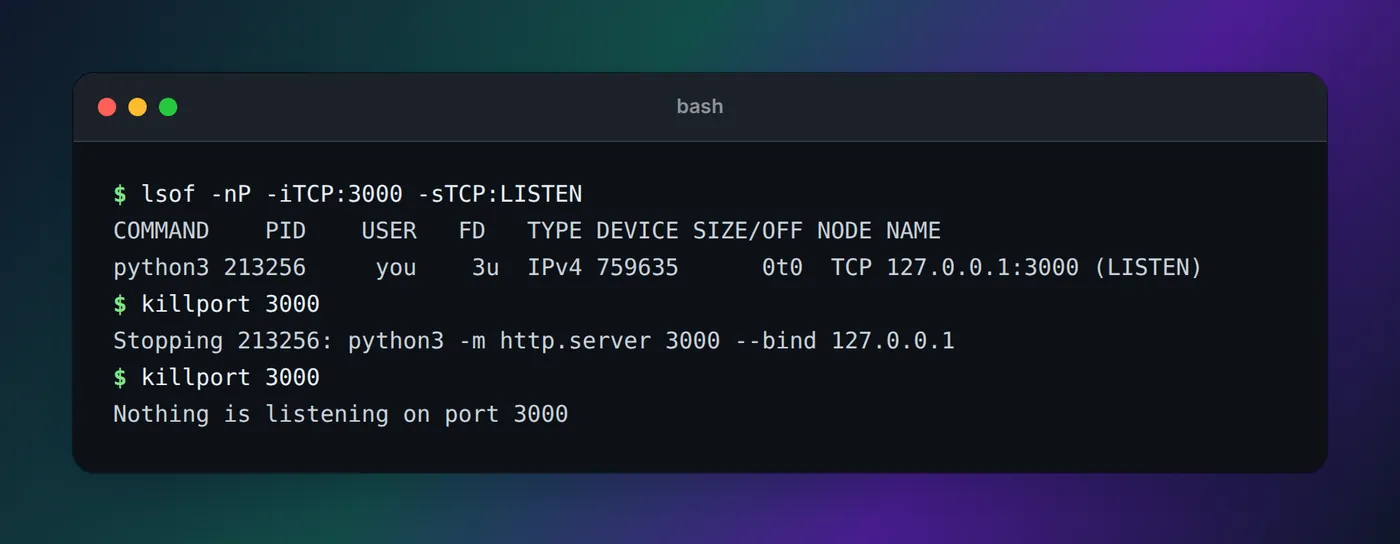
python3 -m http.server 3000 (user name shortened to you).Don't forget the files they leave
Processes aren't the only leftovers. Agents that work in git worktrees leave folders, and every worktree of a JavaScript project grows its own node_modules. List them from the main checkout:
git worktree listRemove one you're done with with git worktree remove <path> (add --force if it has uncommitted changes you don't want), and git worktree prune cleans up records of worktrees whose folders were already deleted. Claude Code runs its own periodic sweep of worktrees it created for subagents and background sessions, and the worktrees docs list the cases it leaves alone, such as any worktree with uncommitted work.
Stop it from happening again
A few habits keep the process list short:
- Ask for dev servers as background tasks. A prompt like "start the dev server in the background" makes it a task Claude Code tracks, so
/taskscan stop it and exit cleans it up. - Give each session its own port. Parallel sessions on the same app collide on the default port. Say which port to use in the first prompt or in the project's
CLAUDE.md. - End sessions on purpose. Exit with
/exit(orCtrl+Dtwice) rather than closing the window, so cleanup gets to run. In an attached background session,/exitonly detaches and the session keeps running; stop it withclaude stop <id>. - Check before you start. If
npm run devsays the port is busy, the old server may still be serving yesterday's code. Run Step 2 before you pick a new port. - Prune background sessions.
claude agentsshows sessions you dispatched days ago; stop or remove the ones you're done with.
If you'd rather see this than remember it, Eddie, our notch app, shows each agent's process tree in the MacBook notch with memory, CPU and ports. Dev servers still running after their terminal closed are flagged and stopped in two clicks, and old node_modules, build folders and worktrees can go to the Trash. That part is in the Mac app, so on Linux and Windows the commands above are the answer. Watching agents from the notch explains how it gets that information.
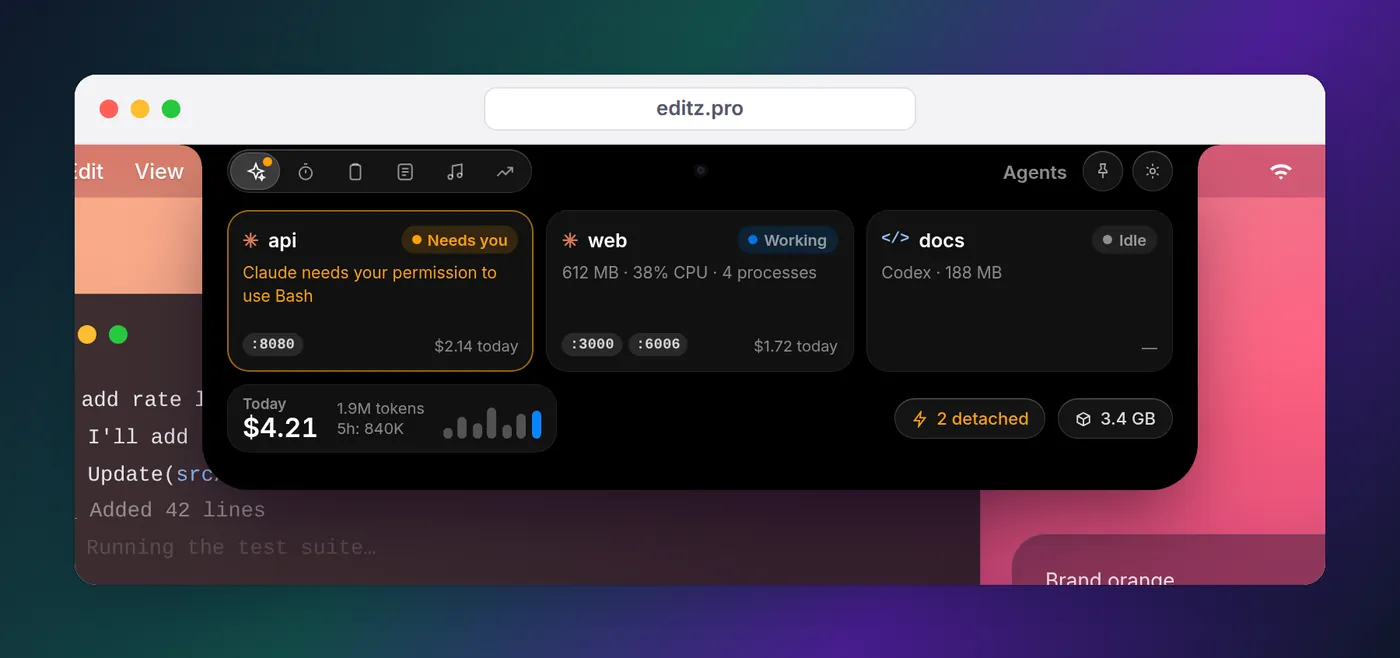
For a session that seems frozen rather than finished, see what each Claude Code state means; a long-running task in the background is often why. And if you want a heads-up the moment an agent needs you, so sessions don't sit idle with servers running, the notification guide has hook configs for every OS.
FAQ
What is a zombie process?
A zombie is a process that has already exited but whose parent hasn't collected its exit status yet. It uses no CPU, memory or ports, only a slot in the process table, and shows as Z in the STAT column of ps. It disappears once the parent reads its status or exits.
What is an orphan process in Linux?
An orphan is a process that is still running after its parent exited. The kernel hands it to init (PID 1) or the nearest subreaper, such as a systemd --user instance, and it keeps running, holding its memory and ports, until something stops it. The dev servers agents leave behind are usually orphans, not zombies.
How do I kill the process on port 3000 on a Mac?
Run lsof -nP -iTCP:3000 -sTCP:LISTEN to see which process is listening, then kill <PID>. Use -sTCP:LISTEN so you only match the server; a bare lsof -ti :3000 also lists your browser's connections to it. If the process ignores kill, kill -9 <PID> forces it.
Does Claude Code stop dev servers when it exits?
It stops the ones it ran as background tasks. The interactive mode docs say background tasks are cleaned up when Claude Code exits, and on macOS and Linux that includes processes that detached from the task's shell. Servers started in another way, such as with nohup or docker compose up -d, or by a session that never got to exit cleanly, can keep running.
Why doesn't kill -9 remove a zombie process?
Because a zombie is already dead, so there's nothing left to kill. Find its parent with ps -o ppid= -p <PID> and fix or stop the parent; when the parent exits, init adopts the zombie and reaps it.
How do I see what Claude Code is running in the background?
Type /tasks inside the session to list its background tasks, check on them, or stop one. For background sessions, run claude agents from your shell, or claude agents --json for a script-friendly list.