
The notch and the Mac
Dynamic Island on a Mac: What Exists, and How to Get One
Macs have no Dynamic Island, but macOS Tahoe shows iPhone Live Activities in the menu bar and notch apps fill the gap. Here's what each option does.
On this page
- What the Dynamic Island is on iPhone
- Does the Mac have a Dynamic Island?
- Live Activities on Mac: Apple's version
- How notch apps create a Dynamic Island on Mac
- A Dynamic Island for developers: your coding agents
- Without installing anything
- What to look for in a Dynamic Island app
- Using a notch app day to day
- Dynamic Island on Windows and Linux
- FAQ
Macs don't have a Dynamic Island. The closest Apple gets is in macOS Tahoe 26 and later, which shows Live Activities from your iPhone in the Mac's menu bar, and the MacBook notch itself is just a black camera housing that does nothing. To get a Dynamic Island on a Mac you install a notch app, which draws a panel that grows out of the notch; for developers, the most useful one is Eddie, which turns it into a live status bar for Claude Code, Codex, Cursor and Gemini CLI.
The Apple facts on this page come from Apple Support, checked on October 3, 2026, with each one linked where it's used.
What the Dynamic Island is on iPhone
On iPhone, the Dynamic Island is the pill-shaped area at the top of the screen that shows alerts and Live Activities while the phone is unlocked. Apple's iPhone guide lists examples such as a Voice Memo recording, an AirDrop connection and directions from Maps. You touch and hold to expand an activity, swipe up to collapse it, and on iPhone 18 Pro models it can show up to three Live Activities at once.
The idea that matters is the shape change. Most of the time it's small and quiet. When something needs you, it grows, shows you what's going on, and shrinks again. That's what people mean when they search for a Dynamic Island on a Mac.
Does the Mac have a Dynamic Island?
No. Here's what Apple actually ships, compared with the iPhone:
| iPhone Dynamic Island | MacBook notch | Live Activities on Mac | |
|---|---|---|---|
| What it is | An interactive area around the camera | The camera housing at the top of the display | iPhone Live Activities shown in the Mac menu bar |
| Shows live information | Yes | No, it's always black | Yes, for activities running on your iPhone |
| Changes shape | Yes | No | Small icon or compact view, depending on menu bar space |
| Needs | A supported iPhone | A MacBook Air or MacBook Pro with a notch | macOS Tahoe 26 or later and iPhone Mirroring |
The notch on a MacBook is part of the display bezel. Apple calls it the camera housing and says it's on the MacBook Air with Liquid Retina display and the MacBook Pro with Liquid Retina XDR display. It holds the camera and nothing else. Desktop Macs (iMac, Mac mini, Mac Studio) and external displays have no notch.
Live Activities on Mac: Apple's version
macOS Tahoe 26 added something close. According to Apple's Live Activities page, once iPhone Mirroring connects your iPhone to your Mac, Live Activities from your iPhone appear in the Mac's menu bar. Depending on the space available, you see either a small icon or a compact view, and clicking it shows more detail. If the iPhone is nearby, double-clicking opens the activity in iPhone Mirroring. The phone has to be on, but it doesn't have to be nearby for the activities to keep arriving.
The requirements, from Apple's iPhone Mirroring page:
| Requirement | Detail |
|---|---|
| Mac | Apple silicon or the Apple T2 Security Chip, macOS Tahoe 26 or later for Live Activities |
| iPhone | iOS 18 or later, with a passcode |
| Account | The same Apple Account on both, with two-factor authentication |
| Connection | Bluetooth and Wi-Fi on both |
| Region | iPhone Mirroring is currently unavailable in the European Union |
To turn it off, open System Settings > Notifications, click "Allow notifications from iPhone", and switch off "Allow Live Activities from iPhone".
This is useful for a food order or a ride, but it's worth being clear about what it isn't. Apple's page only describes activities started on your iPhone. It doesn't turn the notch into anything, and it doesn't show what's happening in apps on the Mac itself.
How notch apps create a Dynamic Island on Mac
A notch app draws a black panel that sits exactly over the notch, so it looks like part of the hardware. When something happens, or when you hover over it, the panel grows downward and shows content, then shrinks back. On a Mac with no notch, some of these apps draw a small one in the middle of the menu bar instead.
They differ mostly in what they put in that panel:
| Kind of notch app | What it shows | Examples |
|---|---|---|
| Developer status | Coding agent sessions, permission alerts, usage | Eddie, Vibe Island |
| Media and widgets | Now Playing, calendar, HUDs, a file shelf | Boring Notch, Alcove |
| Notes and clipboard | Notes, clipboard history, snippets | NotchPad |
| Hide it | Nothing; the notch disappears into the wallpaper | TopNotch |
Our roundup of Mac notch apps for developers compares them in detail, with each app's features and price model taken from its own site. If you mainly want music controls and a file shelf, Boring Notch is free and open source; if the Dynamic Island look itself is the point, Alcove lists fluid transitions, Live Activities and lock screen widgets.
A Dynamic Island for developers: your coding agents
The iPhone pattern fits one developer problem unusually well: knowing what your AI coding agents are doing without watching their terminals.
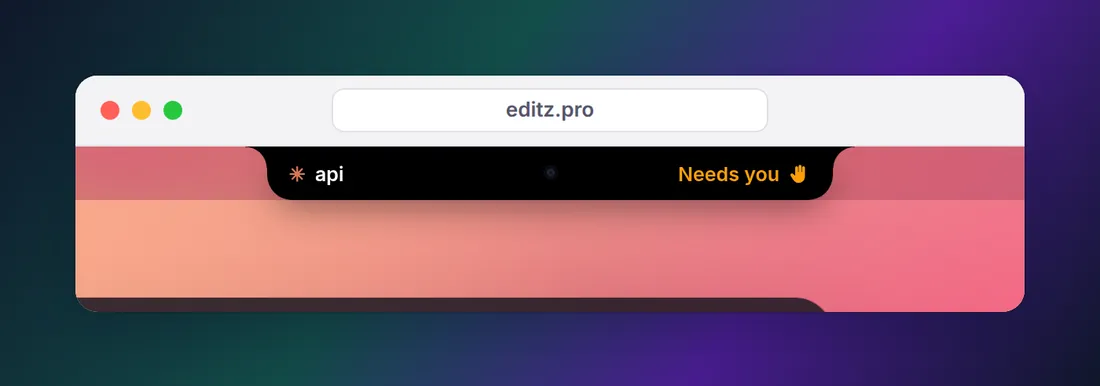
An agent like Claude Code moves between a few states. It works for a while, then either finishes or stops to ask permission to run a command or edit a file. If that prompt is in a terminal behind your editor, the agent just waits. Banners help, but they arrive one at a time, stack up in Notification Center, and don't tell you which of three sessions is still running.
Mapped onto a Live Activity, the states look like this:
| Agent state | What the notch does | Where the signal comes from |
|---|---|---|
| Working | A quiet indicator beside the notch | Hooks such as UserPromptSubmit |
| Needs you | The notch expands with a sound and names the session | The PermissionRequest hook |
| Done | A sound, and the session shows as done | The Stop hook |
| Nothing running | It looks like a normal notch | No events |
Every event in that table is documented in the Claude Code hooks reference, and Codex, Cursor and Gemini CLI have hooks of their own.
Eddie is our notch app built around this. Connecting an agent takes one click: it adds hooks to that agent's config after saving a backup, and from then on each session appears in the notch as working, needs you or done. A permission prompt makes the notch peek out with a sound wherever you are; ⌃⌥A opens the full list from any app. It also shows API-equivalent cost per session for Claude Code and flags dev servers left running after their terminal closed. Its honest limits: on a Mac it needs macOS 14 or later, Cursor doesn't report approvals so Cursor sessions show working and done only, and pending approvals in the Claude desktop app can't be shown.
For the full setup and what it can see for each agent, read how to watch your AI agents from the MacBook notch.
Without installing anything
If you'd rather not add an app, you can get part of the way with the agent's own hooks. A Stop hook that runs osascript -e 'display notification "Done" with title "Claude Code"' gives you a macOS banner when Claude finishes, and a Notification hook with the permission_prompt matcher does the same when it's waiting for you. Our guide to getting notified when Claude Code finishes has complete configs to paste. You won't get a single place that shows every session, but you won't miss a finished task either.
What to look for in a Dynamic Island app
Whichever kind you pick, a few questions sort the options quickly:
- Does it work without a notch? If you often close the laptop and use an external display, the notch isn't there. Some apps draw their panel at the top center of any screen; many sites don't say either way.
- What macOS does it need? Requirements range widely, from macOS 11 for some apps to macOS 26 for others, so check before you buy.
- Is it native? A notch app runs all day, so a native Swift app is a better fit than a bundled web view.
- Where does your data go? A notch app that reads your clipboard, mail or agent sessions should keep that on your Mac. Look for a privacy page that says so plainly.
- Does it interrupt the right amount? The point of the Dynamic Island is that it stays quiet until something actually needs you.
Using a notch app day to day
A few practical notes that apply to any of them:
- Hover, don't click. Ours opens when the pointer rests on the notch, stays exactly the shape of the notch while closed and passes clicks through to the menu bar around it.
- Menu bar icons behind the notch are a separate macOS limit. Apple's fix is "Scale to fit below built-in camera" in an app's Get Info window, which moves the menu bar below the camera housing while that app runs (Apple's article).
- Full screen. The notch is the same spot on every Space and over full-screen apps, which is why it works for alerts.
- Login items. If you stop using one, remove it from System Settings > General > Login Items & Extensions before deleting it, as Apple's login items guide describes.
Dynamic Island on Windows and Linux
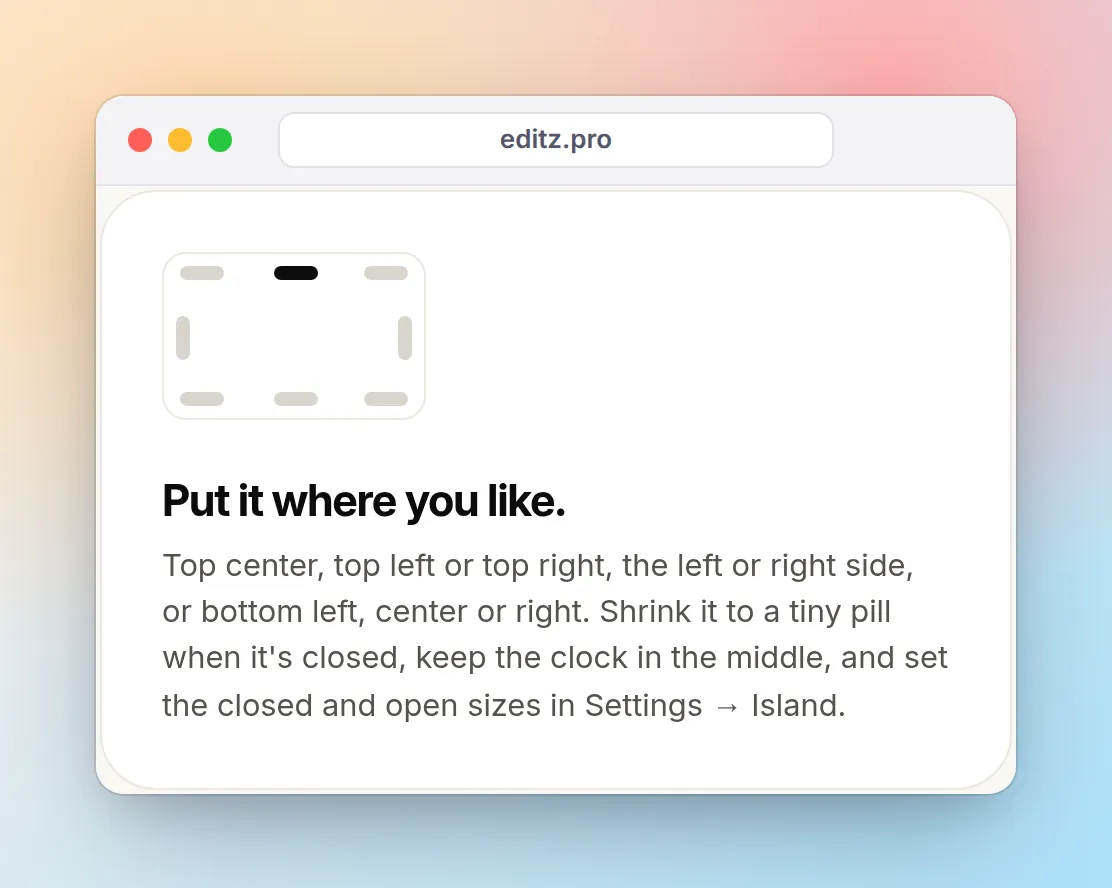
There's no Apple Dynamic Island on Windows or Linux. On Windows 10 or 11, Eddie for Windows puts the same kind of panel at the edge of your desktop: top center like an island, a top corner, a side or the bottom, chosen in Settings → Island, and it can shrink to a tiny pill when closed. It shows your Claude Code, Codex, Cursor and Gemini CLI sessions there, and a borderless fullscreen game or video hides it. Eddie has no Linux version. If you'd rather not install anything, hooks are the cross-platform answer: see Claude Code notifications on Linux and on Windows for configs that use each system's own notifications.
FAQ
How do I get Dynamic Island on my Mac?
Install a notch app. macOS has no Dynamic Island of its own, so apps such as Eddie, Alcove or Boring Notch draw a panel that grows out of the MacBook notch. Separately, macOS Tahoe 26 or later shows Live Activities from your iPhone in the menu bar once iPhone Mirroring is set up.
Is there a free Dynamic Island for Mac?
Yes. Boring Notch is free and open source (GPL-3.0) and focuses on music, calendar and a file shelf. Apple's own Live Activities in the menu bar are free too, but they only show activities running on your iPhone. Eddie, which shows coding agents, is a one-time purchase.
Does the MacBook Air have a Dynamic Island?
No Mac has one. The MacBook Air with Liquid Retina display has a notch, which Apple calls the camera housing, and a notch app can turn it into a Dynamic Island-style panel.
Can I get notifications in the notch on a Mac?
Apple's own notifications and Live Activities don't use the notch itself. Notch apps can show their own alerts there: Alcove lists notifications among its features, and Eddie expands the notch with a sound when a coding agent needs your permission.
Does a Dynamic Island app work on a Mac without a notch?
Some do. Eddie draws a slim notch of its own in the middle of the menu bar on an iMac, Mac mini, Mac Studio or external display, and you choose which display it lives on. Check each app's site, since many don't say.
Is there a Dynamic Island for Windows or Linux?
Not from Apple. On Windows, Eddie for Windows puts a similar panel at the edge of your desktop, top center or wherever you choose, for your coding agents. There's no Linux version; on Linux, the practical way to get agent alerts is Claude Code's hooks with the system's own notifications, and our Linux and Windows guides have the configs.