
The notch and the Mac
The Best Mac Notch Apps for Developers in 2026
The best Mac notch apps for developers, compared: agent status, permission alerts, music, files, notes and free options, checked on each app's own site.
On this page
The best Mac notch app for developers is one that shows your coding agents, because that's what you'd otherwise keep switching windows to check. Eddie turns the notch into a live status bar for Claude Code, Codex, Cursor and Gemini CLI: every session shows as working, needs you or done, and the notch peeks out with a sound the moment one needs permission. If you want the notch for something narrower, such as music, a file shelf or hiding it entirely, the other apps below each do that one job, and we say when to choose them.
Every claim about another app on this page comes from that app's own website or GitHub README, checked on October 3, 2026. Where a site doesn't state something (a price, a system requirement, support for Macs without a notch), the tables say "not stated" rather than guess. Apple's facts come from Apple Support.
The best notch apps, compared
| App | What it puts in the notch | Coding agents | Macs without a notch |
|---|---|---|---|
| Eddie | Agent status and permission alerts, cost, leftover processes; plus clipboard, a note, music, sales and a pomodoro | Claude Code, Codex, Cursor, Gemini CLI, the Claude desktop app | Yes, it draws a slim notch |
| Vibe Island | AI agent sessions with Allow and Deny buttons, plan review, quota | 30 agents listed on its site | Not stated |
| Notchy | A floating Claude Code terminal with tabs | Claude Code | Not stated |
| Boring Notch | Music with a visualizer, calendar, a file shelf with AirDrop, HUDs | No | Not stated |
| Alcove | Live Activities, notifications, HUDs, lock screen widgets | No | Not stated |
| NotchPad | Notes, clipboard history and snippets | Claude and Codex can read and write shared notes | Yes |
| NotchDrop | A file drop zone with AirDrop | No | Not stated |
| TopNotch | Nothing: it makes the notch disappear | No | Not applicable |
And the practical side, from the same sources:
| App | Price model (from its site) | Needs | Source |
|---|---|---|---|
| Eddie | One-time purchase, no subscription, 14-day refund | macOS 14 or later, Apple silicon or Intel; also on Windows 10 or 11 | editz.pro |
| Vibe Island | One-time purchase, free trial | macOS 14 or later | vibeisland.app |
| Notchy | Free, open source (MIT) | macOS 26 or later | notchy.ai |
| Boring Notch | Free, open source (GPL-3.0) | macOS 14 or later, Apple silicon or Intel | GitHub |
| Alcove | $14.99, 72-hour trial, up to 3 devices | Not stated | tryalcove.com |
| NotchPad | Free tier; Pro $9.99 once for up to 3 Macs | Apple silicon, macOS 15 or later | notchpad.app |
| NotchDrop | Free, open source (MIT) | Not stated | GitHub |
| TopNotch | Free | macOS 11 or later | topnotch.app |
NotchNook, one of the best-known notch apps, isn't in these tables. Its official site, lo.cafe, didn't resolve when we checked on October 3, 2026, so we couldn't confirm its current features, price or availability from the source.
What a developer needs from the notch
Most notch apps are built around media and files. That's useful, but it isn't what costs a developer time. The expensive moments are an agent sitting on a permission prompt in a terminal you can't see, a session that finished ten minutes ago without you noticing, and a dev server still holding port 3000 after its terminal closed. A notch app earns its place on a developer's Mac when it handles those:
- State at a glance. Every running session, not just the frontmost one, with a clear difference between "working", "needs you" and "done".
- Interrupts only when it matters. A permission prompt should get your attention immediately. A session that's still working shouldn't.
- Stays out of the menu bar's way. Closed, it should look like a normal notch and let clicks through.
- Local and quiet. Agent hooks see your prompts and file paths. None of that should leave your machine.
- Works on your actual setup, including a closed laptop on an external display, where there's no notch at all.
The notch is a good place for this because it's in the same spot on every Space and over full-screen apps. Our guide to watching AI agents from the MacBook notch explains how a notch app learns what each agent is doing.
1. Eddie: your coding agents in the notch
Eddie is our app, and it's built around the list above. It connects to each agent with one click, adding hooks to that agent's own config file (~/.claude/settings.json, ~/.codex/hooks.json, ~/.cursor/hooks.json or ~/.gemini/settings.json) after saving a backup. From then on each session appears in the notch as working, needs you or done. A permission prompt makes the notch peek out with a sound; a finished task makes a sound too; a quiet indicator shows while agents run. Press ⌃⌥A from any app to open the agents list.
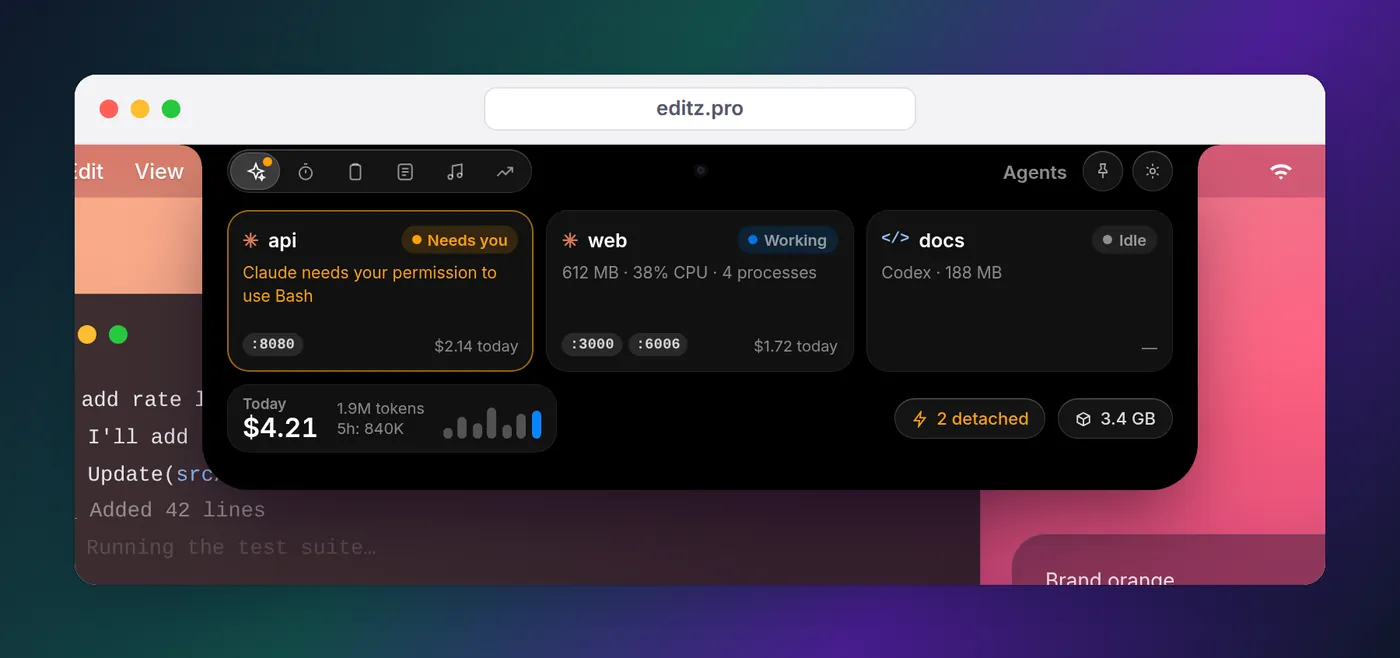
What else it does for developers:
- Cost. Tokens and API-equivalent spend per session, project and day, read from Claude Code's local logs, with no API key. It's what the tokens would cost at list prices, not what a Pro or Max plan bills you.
- Processes. Each agent's process tree with memory, CPU and ports. Dev servers still running after their terminal closed are flagged and stopped in two clicks, and old
node_modules, build folders and worktrees can go to the Trash. - The rest of the notch. The last five clipboard items with previews (⌃⌥V), one autosaving note (⌃⌥N), Now Playing from any app, today's sales from Stripe, Dodo Payments or Polar, mail pop-ups from senders you pick, a Vitals tab for CPU, memory and disk, and a pomodoro timer with guided desk stretches on breaks.
Honest limits, so you can rule it out quickly:
- On a Mac it needs macOS 14 Sonoma or later. Eddie for Windows (Windows 10 or 11, from the Microsoft Store, same key) puts the panel at the edge of the desktop instead of a notch. There's no Linux version.
- It tells you an agent needs permission; it never answers the prompt for you. You approve in the agent's own window.
- Cursor doesn't report approvals through its hooks, so Cursor sessions show working and done only. The Claude desktop app's pending approvals can't be shown either, because they never reach the transcripts it saves.
- Cost is shown for Claude Code and the Claude desktop app only; Codex cost isn't there yet.
- The clipboard keeps five items, on purpose. There's no file shelf, AirDrop, calendar or volume HUD.
The compatibility table on our home page lists exactly what it shows for each agent. On a Mac without a notch, or on an external display, it draws a slim notch in the middle of the menu bar, and you choose which display it lives on.
Other notch apps, and when to choose them
Each of these does something our app doesn't, or does one job in a different way. Pick one if that narrow job is what you want.
Vibe Island
Vibe Island is also aimed at people running coding agents. Its site describes Allow and Deny buttons that expand in the notch when Claude Code asks for permission, Markdown plan review, quota tracking, monitoring agents on remote servers over SSH, and a list of 30 supported agents. It installs with brew install --cask vibe-island.
Choose Vibe Island if you want to approve or deny prompts from the notch itself rather than in the terminal, or you rely on agents beyond the four in the table above.
Notchy
Notchy puts Claude Code itself under the notch: a floating terminal with one tab per project, live status, completion sounds and git checkpoints on ⌘S. Its site says it detects open Xcode projects and starts Claude Code in them, and that it reads status from terminal output. It's free and MIT-licensed, and needs macOS 26.
Choose Notchy if you want to run Claude Code inside a notch panel rather than in your own terminal or editor, especially for Xcode projects.
Boring Notch
Boring Notch is a free, open-source (GPL-3.0) app whose home page calls it a way to turn the notch into a music player. Its README lists music controls with a visualizer, calendar integration, a file shelf with AirDrop, and a replacement for the macOS HUDs. It runs on macOS 14 or later and installs with brew install --cask TheBoredTeam/boring-notch/boring-notch.
Choose Boring Notch if you want a free media and file shelf in the notch and nothing to do with agents.
Alcove
Alcove sells itself as a "Dynamic Island for your Mac": fluid transitions, notifications, Live Activities, swipe gestures, customizable HUDs and lock screen widgets. Its FAQ offers a 72-hour trial, use on up to three devices, and a 14-day refund.
Choose Alcove if the polish and animation of a Dynamic Island is the point, rather than developer tooling. Our Dynamic Island for Mac guide covers that idea in more depth.
NotchPad
NotchPad is a notes app that lives in the notch: rich notes, searchable clipboard history, named snippets, sticky notes pinned to windows, and MCP connections that let Claude, Codex and other AI apps read and write the notes you share with them. It needs an Apple silicon Mac on macOS 15 or later, and works without a notch. The free tier keeps 10 clipboard items; Pro removes the limits.
Choose NotchPad if you want long-term notes and a searchable clipboard archive in the notch, or a shared notepad your agents can write into. For clipboard options in general, see our clipboard history on Mac guide.
NotchDrop
NotchDrop turns the notch into a file drop zone: drag files onto it, open AirDrop from it, and files are kept for a day by default. It's MIT-licensed on GitHub.
Choose NotchDrop if a temporary shelf for files is all you want from the notch.
TopNotch
TopNotch, from the team behind CleanShot, does the opposite of everything above: its site says it "makes the notch disappear". It works with your wallpaper, including macOS dynamic wallpapers, handles multiple displays, and can add rounded corners to your wallpaper. It's free and needs macOS 11 or later.
Choose TopNotch if you'd rather not see the notch at all. It doesn't add anything to it.
Free and open-source options
If the search that brought you here was "mac notch app free", the honest summary is that the free apps are media, file and terminal tools, not agent monitors. Boring Notch, NotchDrop and Notchy are free and open source, and TopNotch is a free download. NotchPad has a free tier.
For agent status without paying anything, you can skip the notch and use Claude Code's own hooks: a Stop hook and a Notification hook with the permission_prompt matcher, each running osascript or afplay. Our guide to getting notified when Claude Code finishes has copy-paste configs for macOS, Linux and Windows. The trade-off is that banners arrive one at a time and pile up, with no single view of every session; that's the gap a notch app fills.
The notch and your menu bar icons
On a MacBook with a notch, menu bar items that don't fit on either side can end up behind it. Apple's fix is per app: select the app in Finder, choose File > Get Info, and turn on "Scale to fit below built-in camera", which moves the menu bar and windows below the camera housing while that app runs, as described in Apple's support article.
A notch app shouldn't make this worse. Ours is exactly the shape of the notch while it's closed, clicks pass straight through to the menu bar around it, and it only opens when your pointer rests on the notch.
How to remove a notch app
If you try a few, clean up the ones you don't keep:
- Quit the app from its menu bar icon or settings.
- Open System Settings > General > Login Items & Extensions and remove it from the list of items that open at login, as Apple's login items guide shows.
- Drag it from Applications to the Trash, or run
brew uninstall --caskwith the cask name you installed it with.
For any app that connected to your coding agents, disconnect them in its settings before deleting it, so your agent configs don't keep calling a helper that's gone. In our app, disconnecting an agent in Settings removes its hooks. If you'd rather check by hand, /hooks in Claude Code lists every hook it has loaded.
If you run several agents side by side, running Claude Code sessions in parallel has tips for keeping them apart, whichever notch app you choose.
FAQ
Is there a free notch app for Mac?
Yes. Boring Notch (GPL-3.0), NotchDrop (MIT) and Notchy (MIT) are free and open source, and TopNotch is a free download that hides the notch instead of using it. NotchPad has a free tier with limits. Eddie and Alcove are paid; Eddie is a one-time purchase with no subscription.
Is there an open-source Mac notch app on GitHub?
Several. Boring Notch (music, calendar, file shelf and HUDs) is on GitHub under GPL-3.0, NotchDrop (a file drop zone with AirDrop) under MIT, and Notchy (a Claude Code terminal under the notch) under MIT.
Do notch apps work on a MacBook Air?
Yes, on the models that have a notch. Apple calls it the camera housing and says it's on the MacBook Air with Liquid Retina display and the MacBook Pro with Liquid Retina XDR display. Some apps, Eddie and NotchPad among them, also work on Macs with no notch by drawing their panel at the top center of the screen.
How do I delete a Mac notch app?
Quit it, remove it from System Settings > General > Login Items & Extensions if it's listed, then drag it from Applications to the Trash, or run brew uninstall --cask with its cask name if you installed it with Homebrew. If the app added hooks to your coding agents, disconnect them in its settings first so no hook points at a missing helper.
Can a notch app show Claude Code's status?
Yes. Claude Code runs hooks when a session starts working, asks for permission and finishes, so a notch app can show each session's state and alert you when one needs you. Eddie does this for Claude Code, Codex, Cursor and Gemini CLI.
Will a notch app hide my menu bar icons?
It shouldn't add to the problem. Eddie stays exactly the shape of the notch while closed, and clicks pass through to the menu bar around it. Icons hidden behind the notch itself are a separate macOS limit; Apple's "Scale to fit below built-in camera" setting fixes it for individual apps.