
Running agents day to day
Claude Code vs Codex vs Gemini CLI: Pricing, Features and Which to Pick
Claude Code vs Codex vs Gemini CLI compared from their official docs: pricing and free tiers, open source, sandboxing, config files, hooks and limits.
On this page
Claude Code vs Codex vs Gemini CLI comes down less to raw ability than to how you pay, how much you trust the defaults, and which ecosystem you already live in. All three are terminal agents that read your repository, edit files and run commands with your approval, and all three support MCP, hooks, subagents and a headless mode for scripts. Claude Code needs a paid Claude plan and is closed source; Codex CLI is open source and comes with ChatGPT Plus and up; Gemini CLI is open source and has a free daily allowance with a personal Google account.
Every fact below comes from each tool's official docs and pricing pages, checked on October 3, 2026: Claude Code, Codex (OpenAI's Codex docs moved from developers.openai.com to learn.chatgpt.com) and Gemini CLI. We don't quote benchmark scores: models change every few months, and a published score can't tell you how an agent will do on your code. Prices and model names change often, so confirm on the linked pages before you buy.
At a glance
| Claude Code | Codex CLI | Gemini CLI | |
|---|---|---|---|
| Made by | Anthropic | OpenAI | |
| Models | Claude | OpenAI's GPT models | Gemini |
| Source | Closed (Anthropic commercial terms) | Open source, Apache 2.0 | Open source, Apache 2.0 |
| Free way to use it | None; the free Claude plan excludes it | Free and Go plans: Codex in the desktop app only | 1,000 requests a day with a personal Google account |
| Individual paid plans | Pro $20 a month, Max from $100 | Plus $20 a month, Pro from $100 | Google AI Pro or Ultra, for higher daily caps |
| Pay per token | Claude Console (API) account | OpenAI API key | Gemini API key or Vertex AI |
| Project instructions | CLAUDE.md (reads AGENTS.md if there's no CLAUDE.md) | AGENTS.md | GEMINI.md (other names configurable) |
| Sandbox | Optional, /sandbox; off by default | OS-enforced, on by default, network off | Optional, -s or GEMINI_SANDBOX |
| Headless mode | claude -p | codex exec | gemini -p |
| Hooks file | ~/.claude/settings.json | ~/.codex/hooks.json | ~/.gemini/settings.json |
| Undo | Automatic checkpoints, /rewind | Git checkpoints recommended | /restore, once checkpointing is enabled |
| Runs on | macOS, Linux, Windows | macOS, Linux, Windows | macOS, Linux, Windows |
The rest of this page explains the rows that matter most when you choose.
Pricing and free tiers
Claude Code requires a Pro, Max, Team, Enterprise or Console account, and the setup docs state plainly that the free claude.ai plan doesn't include it. On Claude's pricing page, Pro is $20 a month, or $17 a month billed annually, and Max starts at $100 a month for 5x or 20x Pro's usage. A Console account bills per token at API rates instead. Our guide to what Claude Code costs breaks the plans down further.
Codex shares usage with ChatGPT. According to the Codex pricing page, the Free ($0) and Go ($8) plans include Codex only in the ChatGPT desktop app, subject to rollout. Plus at $20 a month adds Codex in the CLI, the IDE extension, on the web and on iOS. Pro starts at $100 a month, with tiers at $100, $200 and $500. You can also sign in with an OpenAI API key and pay standard API rates, without the cloud features such as GitHub code review.
Gemini CLI is the only one of the three with a meaningful free tier in the terminal. The quotas page lists, per user per day:
| How you sign in | Daily requests |
|---|---|
| Personal Google account (Gemini Code Assist for individuals) | 1,000 |
| Google AI Pro | 1,500 |
| Google AI Ultra | 2,000 |
| Free Gemini API key | 250, Flash models only |
| Paid API key or Vertex AI | Varies, pay as you go |
Requests are also limited per minute, and the docs note availability can drop in times of high demand. With the free Google sign-in, the CLI decides which Gemini model serves each request.
Limits work differently
A fair comparison of "how much can I do" isn't possible, because the three meter usage differently. Claude subscriptions use a rolling five-hour window plus a weekly limit; the costs docs list the "session limit" and "weekly limit" messages you'll see, and on Pro and Max the status line can show how much of each you've used. Codex's pricing page gives estimated local messages per five-hour period for Plus and Business, says Pro plans currently have no five-hour limit, and notes that weekly limits may apply. Gemini CLI counts model requests per day. Our explainer on Claude Code's 5-hour limit covers how that window resets.
Open source or not
The Codex CLI is developed in the open at openai/codex under the Apache 2.0 license; OpenAI's open source page notes that the IDE extension and Codex cloud are not open source. Gemini CLI is also Apache 2.0, at google-gemini/gemini-cli. Claude Code is not: its repository is where Anthropic takes bug reports, and its license file reserves all rights under Anthropic's commercial terms.
This matters if you want to read exactly what the agent does before it runs, patch it, or build on it. It matters less for day-to-day use, because all three run the model in their maker's cloud either way.
Safety defaults: sandboxes and approvals
All three ask before running commands that their approval rules don't already allow, and all three let you loosen or tighten that. Where they differ is the default boundary around commands that do run.
- Codex is the most locked down out of the box. Its security docs say the agent runs with network access off by default, inside an OS-enforced sandbox that typically limits it to the current workspace, plus an approval policy for when it must stop and ask.
- Claude Code has an OS-level sandbox for the shell commands Claude runs, on macOS, Linux and WSL2, but it's off by default. Turn it on with
/sandbox. Without it, safety comes from permission modes and allow and deny rules. - Gemini CLI sandboxing is opt-in with
-s, theGEMINI_SANDBOXvariable or"tools": {"sandbox": true}in settings. On macOS it can use the built-in Seatbelt profile; elsewhere Docker, Podman and other runtimes are supported.
If you plan to let an agent run unattended, read the relevant page for whichever you pick, whatever its defaults.
Install commands
Each has an official one-line install. Pick one line per tool:
# Claude Code (native installer, macOS, Linux, WSL)
curl -fsSL https://claude.ai/install.sh | bash
# or: brew install --cask claude-code

# Codex CLI (standalone installer, macOS and Linux)
curl -fsSL https://chatgpt.com/codex/install.sh | sh
# or: npm install -g @openai/codex
# or: brew install --cask codex

# Gemini CLI (needs Node.js 20 or later for npm)
npm install -g @google/gemini-cli
# or: brew install gemini-cli
On Windows, Claude Code installs with winget install Anthropic.ClaudeCode and Codex with its PowerShell installer from the Codex CLI page; Gemini CLI installs through npm. Then run claude, codex or gemini in a project folder and sign in.
Project instructions: one file for all three
Each agent reads a Markdown file of standing instructions from your repository: build commands, code style, things to never touch.
- Claude Code reads
CLAUDE.md. Its memory docs say it readsAGENTS.mdinstead when there's noCLAUDE.mdin your working directory or above it, or you can importAGENTS.mdfrom aCLAUDE.md. - Codex reads
AGENTS.md, from~/.codexand from each directory between the project root and your working directory, closest last. - Gemini CLI reads
GEMINI.md, and thecontext.fileNamesetting accepts a list of names.
So if you use more than one agent, write AGENTS.md once and point Gemini CLI at it too:
{
  "context": {
    "fileName": ["AGENTS.md", "GEMINI.md"]
  }
}
If your ~/.gemini/settings.json already has other settings, add the context key alongside them rather than replacing the file.
Extending them: MCP, hooks and subagents
The three have converged here. All support MCP servers for outside tools and data, all run hooks at points in the agent loop, and all can spawn subagents. The details differ:
- Hooks. Claude Code documents 33 hook events, configured in
~/.claude/settings.json. Codex hooks live in~/.codex/hooks.json(orconfig.toml) with the same three-level shape, and Codex skips any hook you haven't reviewed and trusted with/hooks. Gemini CLI configures hooks insettings.jsonand includes aNotificationevent. - Running many sessions. Claude Code builds parallel work into the CLI:
claude --worktreegives each session its own git worktree, and background sessions run under agent view, one screen that shows which ones need you. Our guide to parallel Claude Code sessions covers it in detail. With any of the three, separate terminals in separate worktrees also work. - Undo. Claude Code checkpoints file edits automatically before each prompt, and
/rewindgoes back. Gemini CLI's checkpointing snapshots files before each approved edit and restores with/restore, but it's disabled by default. Codex's docs recommend making Git checkpoints before and after a task.
Which one should you pick?
There's no universal winner, so match the tool to your situation:
- Choose Claude Code if you already pay for Claude, want the deepest hook system, or plan to run several sessions at once and want agent view, worktree isolation and the desktop app's session sidebar built in.
- Choose Codex if you already pay for ChatGPT Plus or Pro, want a sandbox and no network access by default, or want an open-source CLI you can read and patch.
- Choose Gemini CLI if you want to start for free, work mostly in the Google Cloud ecosystem, or want an open-source agent with a generous daily allowance.
You don't have to pick only one. They're separate binaries with separate logins, so running Claude Code in one terminal and Codex or Gemini CLI in another works fine, and a shared AGENTS.md keeps their instructions in sync. Giving two agents the same small task in two worktrees is also the most honest benchmark you can run, because it's your code.
Watching all three at once
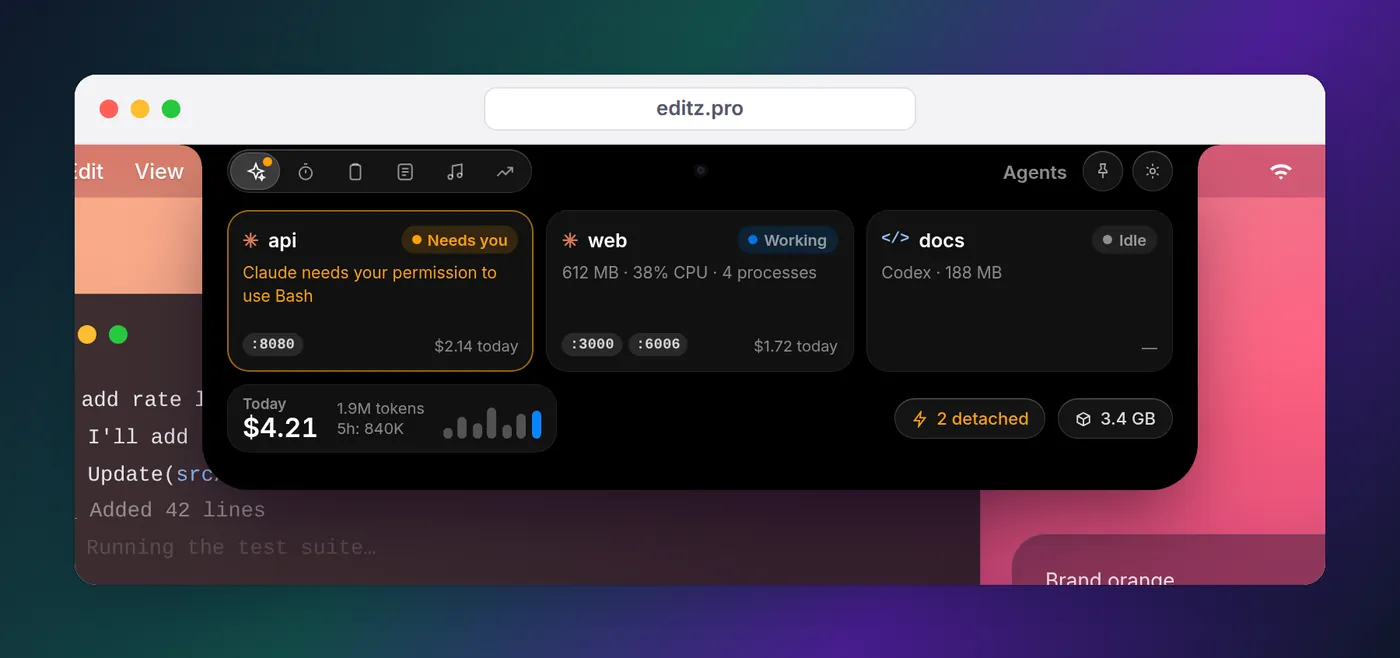
Running more than one agent adds a practical problem: three CLIs, three ways of telling you they're done, and none of them aware of the others. Each has a hook system, so a Stop-style hook in each can send the same desktop notification; our Codex notification guide shows the Codex side and the notification pillar the Claude Code side.
Eddie does this from the notch, on a Mac or at the edge of your Windows desktop. It connects to each agent's hooks in one click and shows every Claude Code, Codex and Gemini CLI session as working, needs you or done, and taps you when one needs permission; on a Mac it adds each session's memory, CPU and ports. Codex asks you to trust the hook once in /hooks. The limits are honest ones: cost tracking covers Claude Code only and is on the Mac, Cursor's agent reports working and done but not approvals, and there's no Linux version. Watching agents from the notch has the full per-agent table.
FAQ
Which is better, Claude Code or Codex?
Neither docs page claims a winner, and no single benchmark settles it for your codebase. Both read your repository, edit files and run commands with your approval. The practical differences are the subscription you already pay for, Codex being open source with a sandbox on by default, and Claude Code's features for running many sessions, such as agent view. Try both on the same real task.
How does Claude Code pricing compare with Codex?
Both start at $20 a month: Claude Pro ($17 a month billed annually) and ChatGPT Plus. Both have higher tiers from $100 a month, and both can bill per token through an API key instead. The free Claude plan doesn't include Claude Code; ChatGPT's Free and Go plans include Codex only in the desktop app.
Is Gemini CLI free?
Yes, with limits. Signing in with a personal Google account gives you up to 1,000 model requests per day through Gemini Code Assist for individuals, and a free Gemini API key gives 250 requests per day on Flash models. Google AI Pro and Ultra subscriptions raise the daily cap to 1,500 and 2,000.
Is Codex CLI open source?
Yes. The Codex CLI lives in the openai/codex repository under the Apache 2.0 license, and so does Gemini CLI in google-gemini/gemini-cli. Claude Code is not open source; its GitHub repository is for issues and its license points to Anthropic's commercial terms.
Can I use Claude Code and Gemini CLI together?
Yes. They're separate programs, so you can run them side by side in different terminals or worktrees. Keep one instructions file for both: Claude Code reads AGENTS.md when there's no CLAUDE.md, Codex reads it natively, and Gemini CLI reads it if you add it to context.fileName in ~/.gemini/settings.json.
Which has the highest usage limits?
They're measured differently, so there's no direct comparison. Claude plans use a rolling five-hour window plus a weekly limit. Codex shows estimated messages per five-hour period on Plus and Business, says Pro plans currently have no five-hour limit, and notes weekly limits may apply. Gemini CLI counts requests per day.